

Why Stateless Turns?
Traditional conversational AI systems often maintain complex internal state, making them difficult to debug, test, and scale. The stateless approach treats each turn of the conversation as an independent, deterministic function that receives all necessary context through input variables.The Black Box Approach
The best way to build reliable conversational AI is to treat each turn as a black box. You provide inputs (conversation history, current query, available tools) and receive outputs (response, tool calls, next actions). This approach optimizes for rapid development and iteration - you’re simply crafting prompts in natural language and validating outputs. By building your conversational system around this principle, you enable quick prompt iterations and fast feedback cycles, which are essential for developing robust multi-turn interactions. The stateless approach particularly shines when it comes to systematic evaluation of conversation flows. For a deeper dive into evaluating multi-turn conversations, check out our blog post on best practices for evaluating back-and-forth conversational AI.Implementation Pattern
Here’s the core pattern for implementing stateless multi-turn chat usingpromptlayer_client.run():
Basic Conversation (No Tools)
Maintain a running history of the conversation, adding each exchange as you go.- Start with empty conversation history
- Loop:
- Send user question + history to PromptLayer
- Get AI response
- Add both to history
- Get next user question
- If no more questions, exit loop
View Flow Diagram
View Flow Diagram
View Python Code
View Python Code
Conversation with Tools
The AI can make multiple tool calls before responding, accumulating results in a separate message buffer. For a deeper understanding of when and how to use tool calling, check out our blog post on tool calling with LLMs.- Start with empty history and empty tool messages
- Loop:
- Send user question + history + tool messages to PromptLayer
- Get AI response
- If AI wants to use tools:
- Add AI message to tool messages
- Execute each tool
- Add tool results to tool messages
- Loop back (AI might need more tools)
- Else (final response):
- Add everything to history
- Clear tool messages for next turn
- Get next user question
View Flow Diagram
View Flow Diagram
View Python Code
View Python Code
You can also implement this pattern using workflows for more complex pipelines with multiple nodes and conditional logic. See Running Workflows for details on using
promptlayer_client.run_workflow().Designing Your Stateless Prompt
Your prompt template should be designed to receive all necessary state through input variables. Here’s an example of a properly configured multi-turn assistant with tools: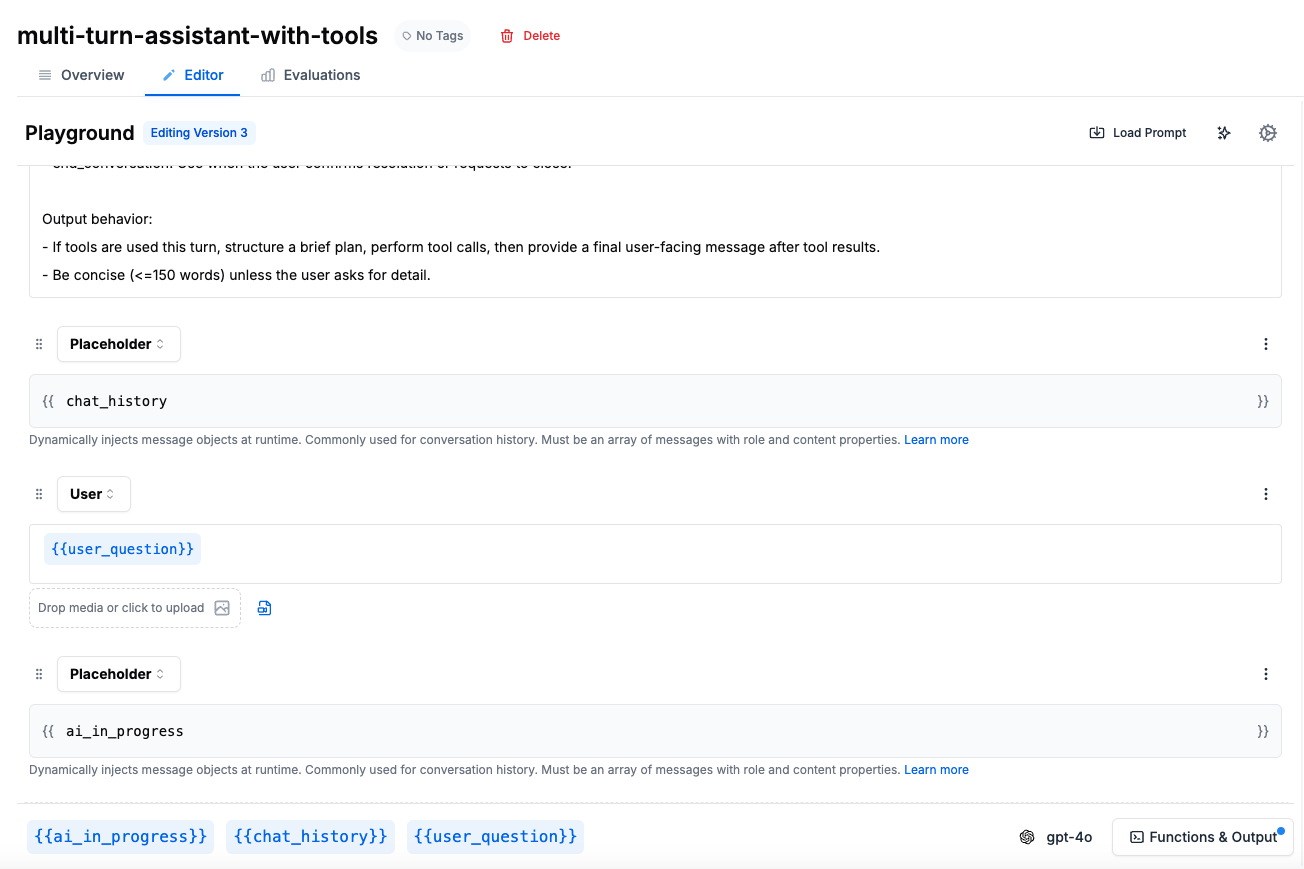
- A system message with instructions and tool usage behavior
- Placeholder for
{{chat_history}}to inject conversation context - User message with
{{user_question}} - Placeholder for
{{ai_in_progress}}to handle tool interactions
Required Input Variables
- chat_history: Array of previous messages in the conversation
- user_question: The current user message or query
- ai_in_progress: Array of messages representing ongoing tool interactions (only used with tools, placed AFTER user_question)
Understanding ai_in_progress
Theai_in_progress variable is specifically for handling multi-step tool interactions where the AI needs to make multiple tool calls before responding to the user. It’s placed AFTER the user_question because it represents the AI’s response to that question. It contains a sequence of messages like:
- AI’s tool call (in response to user_question)
- Tool’s response
- AI’s next tool call
- Tool’s response
- Final AI message to user
Using Message Placeholders
Message Placeholders are crucial for injecting conversation context into your prompts. They allow you to dynamically insert the conversation history into your prompt template. For more details on template variables and dynamic prompts, see our Template Variables guide:Handling Tool Calls
For workflows that use tools, maintain tool state externally. See our Tool Calling documentation for setting up tool definitions in your prompts:Integration with Evaluation
The stateless approach makes it easy to evaluate your conversational AI:- Record real conversations as sequences of inputs and outputs
- Replay conversations with modified parameters to test variations
- Evaluate individual turns for quality and correctness
- Test edge cases by crafting specific conversation states
Next Steps
- Explore Message Placeholders for dynamic prompt construction
- Set up Evaluations for your conversational flows
- Learn about Workflow development for complex pipelines
- Read our guide on Tool Calling for implementing tool-enabled assistants
- Check out Structured Outputs for formatted responses