Legacy Evaluations, Reports, and Datasets remain available for existing projects. Use Tables for new workflows.
Tables bring legacy Dataset, Evaluation, and Report workflows into one place: rows, computed steps, runs, scoring, history, and analytics.

Convert a legacy view to a Table

When a legacy Dataset or Evaluation page shows a migration banner, click Convert to Table. PromptLayer creates the Table from the legacy object and opens it so you can review sheets, rows, columns, scoring, and run status before moving production workflows. Use the conversion button first when it appears. Rebuild manually only when you are working from exports, logs, or a legacy workflow without the banner.
Legacy Evaluation page showing the Convert to Table migration button

Concept mapping

Legacy conceptTable concept
Dataset groupTable
Dataset rowTable row
Dataset columnText column
Dataset versionSheet version
Evaluation pipelineSheet with computed columns
Evaluation stepComputed column
Report runRecalculation operation
Report outputComputed cell output
Report score cardSheet score configuration
Report historyHistory, versions, and score history

Migration checklist

  1. Convert from the legacy page when the banner is available.
  2. Review generated sheets, rows, columns, scoring, and run status.
  3. For manual rebuilds, import rows from CSV or request history.
  4. Recreate missing evaluation steps as computed columns.
  5. Map sources, configure scoring, and rerun stale or pending cells.
  6. Compare outputs, score, history, and analytics before moving automation to the Tables API.

Manual rebuild shortcuts

Use these paths when conversion is not available.
Legacy workflowTable workflow
Dataset from CSV or JSONCreate a Table, click Upload, choose From computer, then add computed columns and scoring in the same sheet.
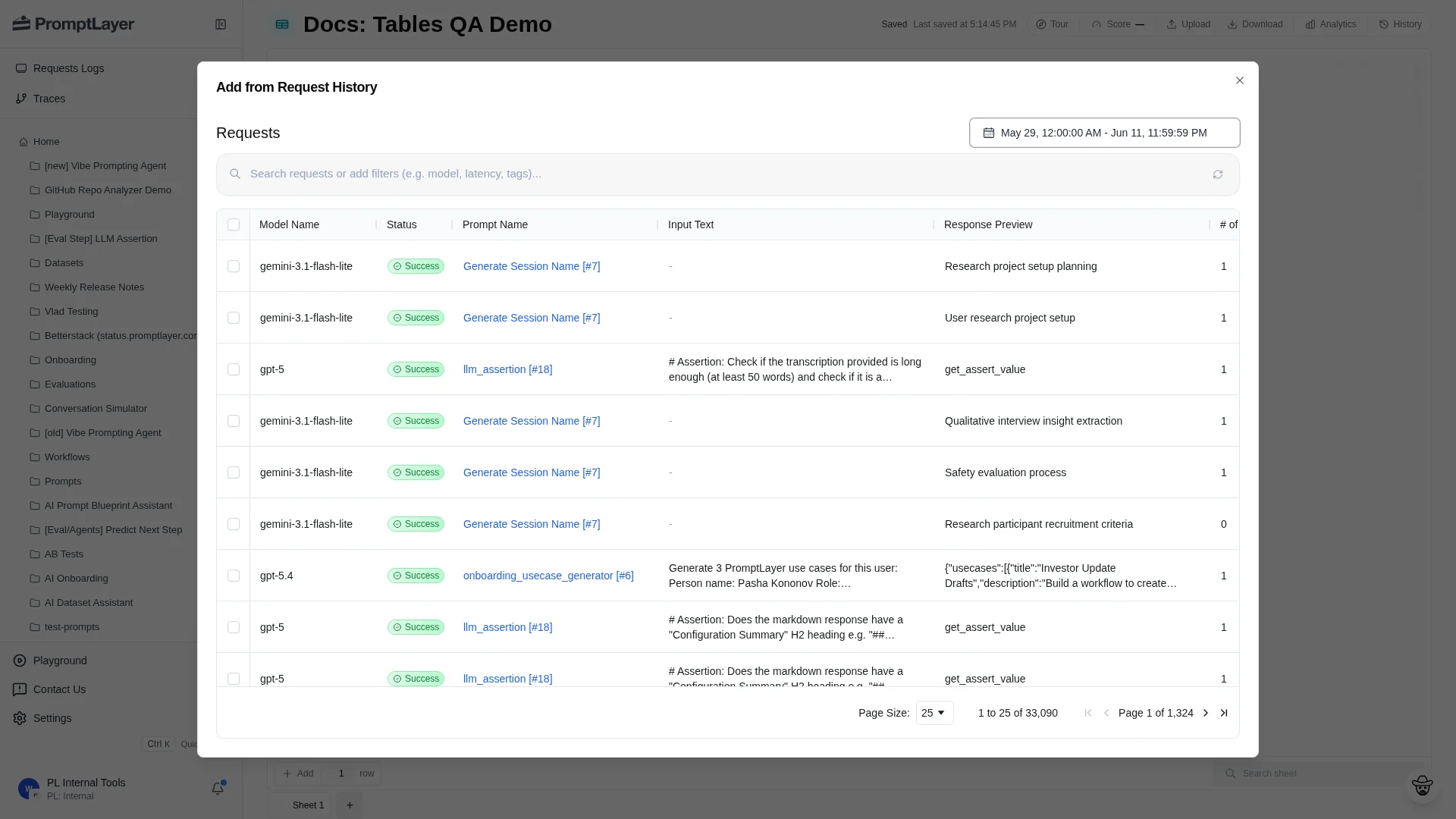
Dataset from request historyCreate a Table, click Upload, choose From request history, select requests, then click Add to Sheet.
Evaluation pipelinePut inputs in text columns, add one computed column for each evaluation step, map Prompt Template variables to source columns, run the computed columns, and configure scoring.
Report runRun the Table, a computed column, or selected stale work. Inspect cells in place, then use Score, Analytics, and History to review results.
Import request history directly into a Table sheet

Automation mapping

Legacy automationTables API
Create Dataset GroupCreate Table
Upload Dataset fileCreate file import
Create Dataset from request logsCreate request-log import
Add Evaluation stepCreate column
Run ReportCreate operation
Poll Report statusGet operation
Read Report scoreGet sheet score
Save checkpointCreate sheet version
Migrate one workflow at a time. Review the generated Table before changing automation, confirm outputs and scores match the old workflow, then move automation to the Tables API. Keep the legacy workflow read-only until the Table is trusted.