> ## Documentation Index
> Fetch the complete documentation index at: https://docs.promptlayer.com/llms.txt
> Use this file to discover all available pages before exploring further.
# Provisioning & access
> How users get workspace access through JIT provisioning, group mappings, and Directory Sync deprovisioning.
Enterprise Identity separates **org membership** (who belongs to the organization) from **workspace access** (which workspaces they can use and with which roles). This page covers how users are created, granted access, and removed.
## JIT provisioning
When **JIT provisioning** is enabled in [Sign-in policy](/why-promptlayer/enterprise-identity/sign-in-security), a user who successfully authenticates via SSO for the first time automatically receives:
* A PromptLayer user account (if one did not exist)
* An **organization membership** row for your org
* Workspace access according to [group mappings](#group-mappings) and the [default workspace](#default-workspace)
Allowed email domains are configured on the **WorkOS SSO connection**, not in PromptLayer. Users outside those domains are denied at SSO and recorded in the audit log.
JIT provisioning creates the account—it does not bypass workspace authorization. A new user with no group mappings and no default workspace lands on the [no workspace access](#no-workspace-access) screen.
## Group mappings
**Group mappings** connect IdP directory groups to workspace roles. When Directory Sync adds a user to a mapped group, PromptLayer grants the corresponding workspace role. When they leave the group, identity-managed role grants are recomputed.
### Creating a mapping
Under **Organization Settings → Enterprise Identity → Group mappings**:
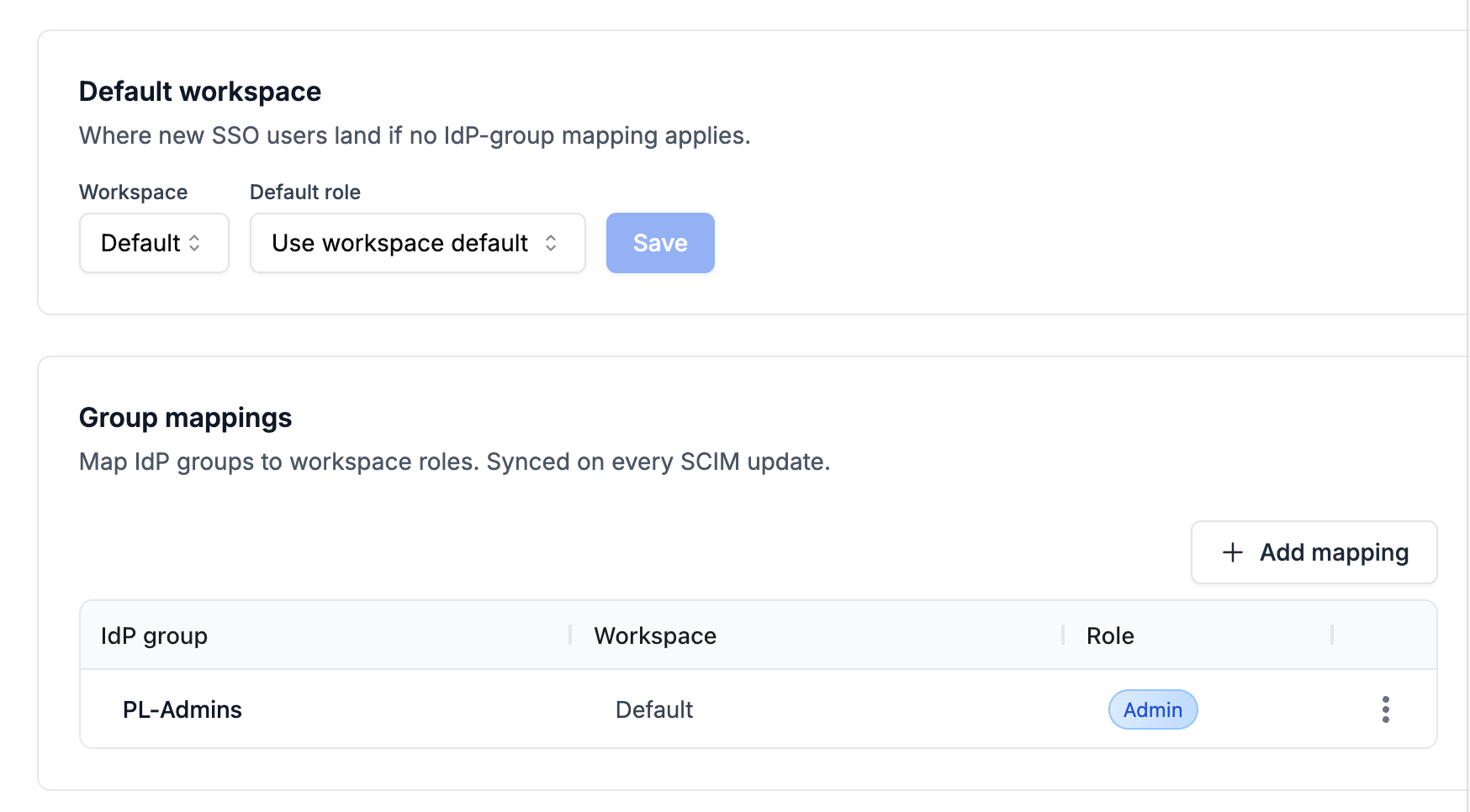 1. Click **Add mapping**.
2. Select an **IdP group** (synced via Directory Sync).
3. Select a **workspace** in your organization.
4. Select a **role**.
### Assignable roles
Group mappings can assign these **default workspace roles** only:
* `Admin`
* `Contributor`
* `Publisher`
* `Developer`
**Custom organization roles cannot be assigned through group mappings** in the current release. SCIM and group sync only resolve global default roles. Assign custom roles manually in the dashboard if needed—they are not removed by group recompute because they are not marked identity-managed.
### Multiple groups and workspaces
* A user can belong to multiple IdP groups, each mapped to different workspaces or roles.
* If multiple mappings apply to the **same workspace**, PromptLayer uses the **most privileged role** (by role rank) for that workspace.
* Manual **Admin** grants are preserved during group recompute—only roles created by identity sync are identity-managed and subject to automatic removal.
### Last Admin protection
PromptLayer blocks group mapping changes that would remove the last **Admin** from a workspace. These blocked attempts appear in the audit log as `group_mapping_blocked_last_admin`.
## Default workspace
The **Default workspace** section configures where JIT-provisioned users land when **no group mapping** applies:
* **Workspace** — target workspace in your org
* **Role** — workspace role to grant (from roles available in that workspace)
If both are set, new SSO users receive membership and the selected role on that workspace. If unset, new users have org membership only until an Owner adds mappings, invites them to a workspace, or assigns access manually.
## No workspace access
When a user signs in via SSO but has no active workspace memberships, PromptLayer shows a dedicated **No workspace access** page instead of the main app.
1. Click **Add mapping**.
2. Select an **IdP group** (synced via Directory Sync).
3. Select a **workspace** in your organization.
4. Select a **role**.
### Assignable roles
Group mappings can assign these **default workspace roles** only:
* `Admin`
* `Contributor`
* `Publisher`
* `Developer`
**Custom organization roles cannot be assigned through group mappings** in the current release. SCIM and group sync only resolve global default roles. Assign custom roles manually in the dashboard if needed—they are not removed by group recompute because they are not marked identity-managed.
### Multiple groups and workspaces
* A user can belong to multiple IdP groups, each mapped to different workspaces or roles.
* If multiple mappings apply to the **same workspace**, PromptLayer uses the **most privileged role** (by role rank) for that workspace.
* Manual **Admin** grants are preserved during group recompute—only roles created by identity sync are identity-managed and subject to automatic removal.
### Last Admin protection
PromptLayer blocks group mapping changes that would remove the last **Admin** from a workspace. These blocked attempts appear in the audit log as `group_mapping_blocked_last_admin`.
## Default workspace
The **Default workspace** section configures where JIT-provisioned users land when **no group mapping** applies:
* **Workspace** — target workspace in your org
* **Role** — workspace role to grant (from roles available in that workspace)
If both are set, new SSO users receive membership and the selected role on that workspace. If unset, new users have org membership only until an Owner adds mappings, invites them to a workspace, or assigns access manually.
## No workspace access
When a user signs in via SSO but has no active workspace memberships, PromptLayer shows a dedicated **No workspace access** page instead of the main app.
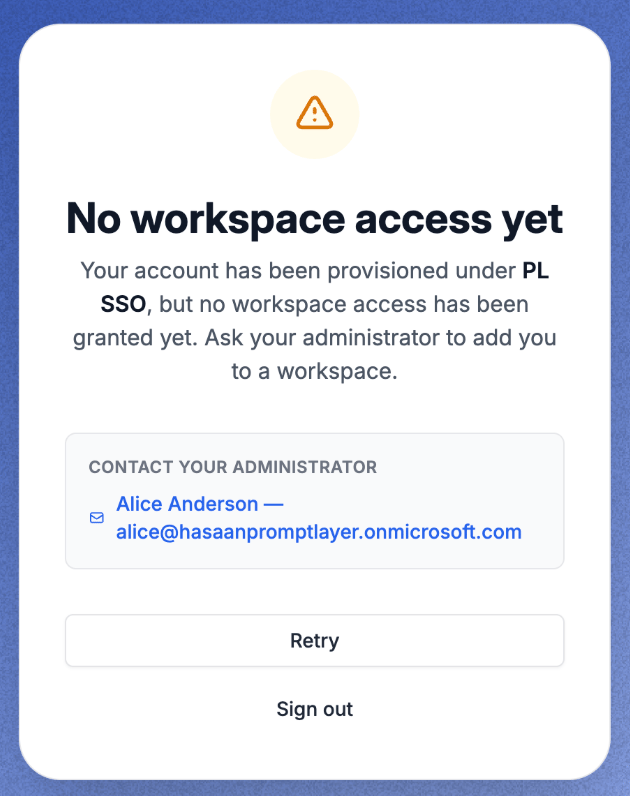 The page includes:
* Your organization name
* Contact information for an org Owner (when available)
* Pending **workspace invitations** the user can accept inline
Once the user gains workspace access—via group mapping sync, default workspace, invite acceptance, or manual admin action—they are redirected to the dashboard automatically.
## Directory Sync lifecycle
### User created or updated
SCIM **create** and **update** events sync profile fields (email, display name, username, active flag) into PromptLayer's external identity record. Group membership events add or remove directory group links.
### User deactivated
When your IdP deactivates a user (or removes them from the SCIM application), PromptLayer:
1. **Soft-deletes org membership** for that organization (`deleted_at` set)—the user slot remains occupied; the same IdP identity cannot be re-provisioned under the original external ID.
2. **Soft-deletes workspace memberships** in that org and revokes identity-managed workspace roles.
3. **Invalidates active sessions** for the deactivated user.
4. Runs **workspace Admin continuity** if the user was the only Admin (see below).
Deprovisioning is **organization-scoped**. If a user belongs to multiple PromptLayer organizations, losing access in one enterprise-managed org does not deactivate their account globally or affect other orgs.
### Reactivation
Deprovisioned external identities **cannot be reactivated** through SSO or SCIM under the same IdP external identifier. A new PromptLayer user (different email / new identity path) is required. Reactivation attempts are logged as `reactivation_attempt_rejected`.
## Workspace ownership on deprovision
When a deprovisioned user was the only **Admin** on a workspace, PromptLayer promotes a replacement Admin using this chain:
1. **`fallback_owner_user_id`** on the workspace (if configured and the user is still an active member)
2. **Oldest org Owner** who is a current workspace member
3. **Oldest workspace member** by membership creation time
If no candidate exists, the workspace is marked **orphaned** and an audit event is written. Owners can set a fallback owner per workspace from organization workspace settings.
## Workspace fallback owner
For each workspace, you can designate a **fallback owner**—the first user in the ownership transfer chain when an Admin is deprovisioned. Configure this from **Organization Settings → Workspaces** when Enterprise Identity is enabled.
Choose an active member who should inherit Admin responsibility if the current sole Admin is removed by SCIM.
## Manual access alongside SCIM
Owners can still invite users, assign roles manually, and manage workspaces in the dashboard. Manual **Admin** grants survive group recompute. Use manual assignment for exceptions; use group mappings for directory-driven access at scale.
## Manual remove from workspace
In enterprise-managed organizations, **Remove from workspace** (or **Leave workspace**) is a **workspace-level** action—it does not remove org membership.
When an Owner removes a member from a workspace:
* The user's **organization membership is preserved** — they remain visible under **Organization Settings → Members**.
* Their **workspace membership is soft-deleted** — they lose access to that workspace immediately and no longer see it in the sidebar.
* **Identity-managed workspace roles** for that workspace are revoked.
* If the removed workspace was their default, PromptLayer clears the default workspace until they gain access elsewhere.
**Directory Sync can re-add access.** If the user is still in an IdP group mapped to that workspace, the next Directory Sync may grant workspace access again. To permanently revoke access, remove the user from the mapped IdP group (or deprovision them in your IdP).
### Manual remove vs IdP deprovision
| Action | Org membership | Workspace access | Can be restored by Directory Sync? |
| ------------------------------------- | -------------- | ----------------------------------- | --------------------------------------------------------------------------------- |
| **Remove from workspace** (dashboard) | Kept | Revoked for that workspace | Yes — if user remains in a mapped IdP group |
| **Remove from IdP group** | Kept | Revoked when group membership syncs | N/A — IdP is the source of truth |
| **SCIM deactivation** | Soft-deleted | Revoked for all org workspaces | No — deprovisioned identities cannot be reactivated under the same IdP identifier |
### No workspace access after manual remove
If a user is removed from their only workspace and has no other access paths, they land on the [no workspace access](#no-workspace-access) page on next sign-in. They remain an org member until an Owner grants access again, they accept a workspace invite, or Directory Sync re-provisions them through a group mapping.
The page includes:
* Your organization name
* Contact information for an org Owner (when available)
* Pending **workspace invitations** the user can accept inline
Once the user gains workspace access—via group mapping sync, default workspace, invite acceptance, or manual admin action—they are redirected to the dashboard automatically.
## Directory Sync lifecycle
### User created or updated
SCIM **create** and **update** events sync profile fields (email, display name, username, active flag) into PromptLayer's external identity record. Group membership events add or remove directory group links.
### User deactivated
When your IdP deactivates a user (or removes them from the SCIM application), PromptLayer:
1. **Soft-deletes org membership** for that organization (`deleted_at` set)—the user slot remains occupied; the same IdP identity cannot be re-provisioned under the original external ID.
2. **Soft-deletes workspace memberships** in that org and revokes identity-managed workspace roles.
3. **Invalidates active sessions** for the deactivated user.
4. Runs **workspace Admin continuity** if the user was the only Admin (see below).
Deprovisioning is **organization-scoped**. If a user belongs to multiple PromptLayer organizations, losing access in one enterprise-managed org does not deactivate their account globally or affect other orgs.
### Reactivation
Deprovisioned external identities **cannot be reactivated** through SSO or SCIM under the same IdP external identifier. A new PromptLayer user (different email / new identity path) is required. Reactivation attempts are logged as `reactivation_attempt_rejected`.
## Workspace ownership on deprovision
When a deprovisioned user was the only **Admin** on a workspace, PromptLayer promotes a replacement Admin using this chain:
1. **`fallback_owner_user_id`** on the workspace (if configured and the user is still an active member)
2. **Oldest org Owner** who is a current workspace member
3. **Oldest workspace member** by membership creation time
If no candidate exists, the workspace is marked **orphaned** and an audit event is written. Owners can set a fallback owner per workspace from organization workspace settings.
## Workspace fallback owner
For each workspace, you can designate a **fallback owner**—the first user in the ownership transfer chain when an Admin is deprovisioned. Configure this from **Organization Settings → Workspaces** when Enterprise Identity is enabled.
Choose an active member who should inherit Admin responsibility if the current sole Admin is removed by SCIM.
## Manual access alongside SCIM
Owners can still invite users, assign roles manually, and manage workspaces in the dashboard. Manual **Admin** grants survive group recompute. Use manual assignment for exceptions; use group mappings for directory-driven access at scale.
## Manual remove from workspace
In enterprise-managed organizations, **Remove from workspace** (or **Leave workspace**) is a **workspace-level** action—it does not remove org membership.
When an Owner removes a member from a workspace:
* The user's **organization membership is preserved** — they remain visible under **Organization Settings → Members**.
* Their **workspace membership is soft-deleted** — they lose access to that workspace immediately and no longer see it in the sidebar.
* **Identity-managed workspace roles** for that workspace are revoked.
* If the removed workspace was their default, PromptLayer clears the default workspace until they gain access elsewhere.
**Directory Sync can re-add access.** If the user is still in an IdP group mapped to that workspace, the next Directory Sync may grant workspace access again. To permanently revoke access, remove the user from the mapped IdP group (or deprovision them in your IdP).
### Manual remove vs IdP deprovision
| Action | Org membership | Workspace access | Can be restored by Directory Sync? |
| ------------------------------------- | -------------- | ----------------------------------- | --------------------------------------------------------------------------------- |
| **Remove from workspace** (dashboard) | Kept | Revoked for that workspace | Yes — if user remains in a mapped IdP group |
| **Remove from IdP group** | Kept | Revoked when group membership syncs | N/A — IdP is the source of truth |
| **SCIM deactivation** | Soft-deleted | Revoked for all org workspaces | No — deprovisioned identities cannot be reactivated under the same IdP identifier |
### No workspace access after manual remove
If a user is removed from their only workspace and has no other access paths, they land on the [no workspace access](#no-workspace-access) page on next sign-in. They remain an org member until an Owner grants access again, they accept a workspace invite, or Directory Sync re-provisions them through a group mapping.