> ## Documentation Index
> Fetch the complete documentation index at: https://docs.promptlayer.com/llms.txt
> Use this file to discover all available pages before exploring further.
# Overview
> Centralize authentication and user lifecycle for your organization with SSO, Directory Sync, and automated workspace access.
**Enterprise Identity** lets organization Owners connect PromptLayer to your corporate identity provider (IdP). Members sign in with **SSO** (SAML or OIDC via WorkOS), and user lifecycle changes from your IdP—create, update, group membership, deactivation—flow into PromptLayer through **Directory Sync** (SCIM).
Enterprise Identity is an **Enterprise feature**. [Contact us](mailto:hello@promptlayer.com) to enable it for your organization or self-hosted deployment.
## What it provides
* **Single sign-on (SSO)** — Sign in through Okta, Microsoft Entra ID, Google Workspace, or any SAML/OIDC IdP supported by [WorkOS](https://workos.com).
* **Directory Sync (SCIM)** — Provision and deprovision users and groups from your IdP without manual PromptLayer admin work.
* **Group-to-role mappings** — Map IdP groups to workspace roles so access stays in sync with your directory.
* **Sign-in policy** — Optionally require SSO for all org members while preserving an emergency access path for one Owner.
* **Audit log** — Org-scoped record of SSO events, SCIM changes, mapping updates, and access grants.
Enterprise Identity is **additive**. Users and organizations without it enabled continue to use email/password and social login unchanged.
## How it fits with RBAC
Enterprise Identity builds on [RBAC (Role-Based Access Control)](/why-promptlayer/rbac):
* **Enabling Enterprise Identity automatically enables RBAC** for that organization. Group mappings assign workspace roles (`Admin`, `Contributor`, `Publisher`, `Developer`), and deprovisioning respects role grants marked as identity-managed.
* **Disabling Enterprise Identity also disables RBAC** for that organization, returning it to the pre-enterprise state. Re-enable RBAC independently with your usual admin tools if you still need it.
Workspace permissions still come from roles. Enterprise Identity controls **who** is in the org and **which workspace roles** IdP group membership grants—not individual prompt or workflow ACLs.
## Architecture at a glance
```mermaid theme={null}
flowchart LR
IdP["Your IdP\n(Okta / Entra / etc.)"]
WorkOS["WorkOS\n(SSO + Directory Sync)"]
PL["PromptLayer"]
IdP -->|"SAML / OIDC sign-in"| WorkOS
IdP -->|"SCIM / group events"| WorkOS
WorkOS -->|"SSO callback + webhooks"| PL
PL -->|"Org members, workspace roles, audit log"| PL
```
PromptLayer does not host a custom SCIM endpoint. Directory events are delivered through WorkOS webhooks and processed into PromptLayer's org, workspace, and role tables.
## Who can configure it
Only **organization Owners** see the **Enterprise Identity** tab under **Organization Settings**. Members and non-Owners rely on SSO sign-in and IdP-driven access once the feature is configured.
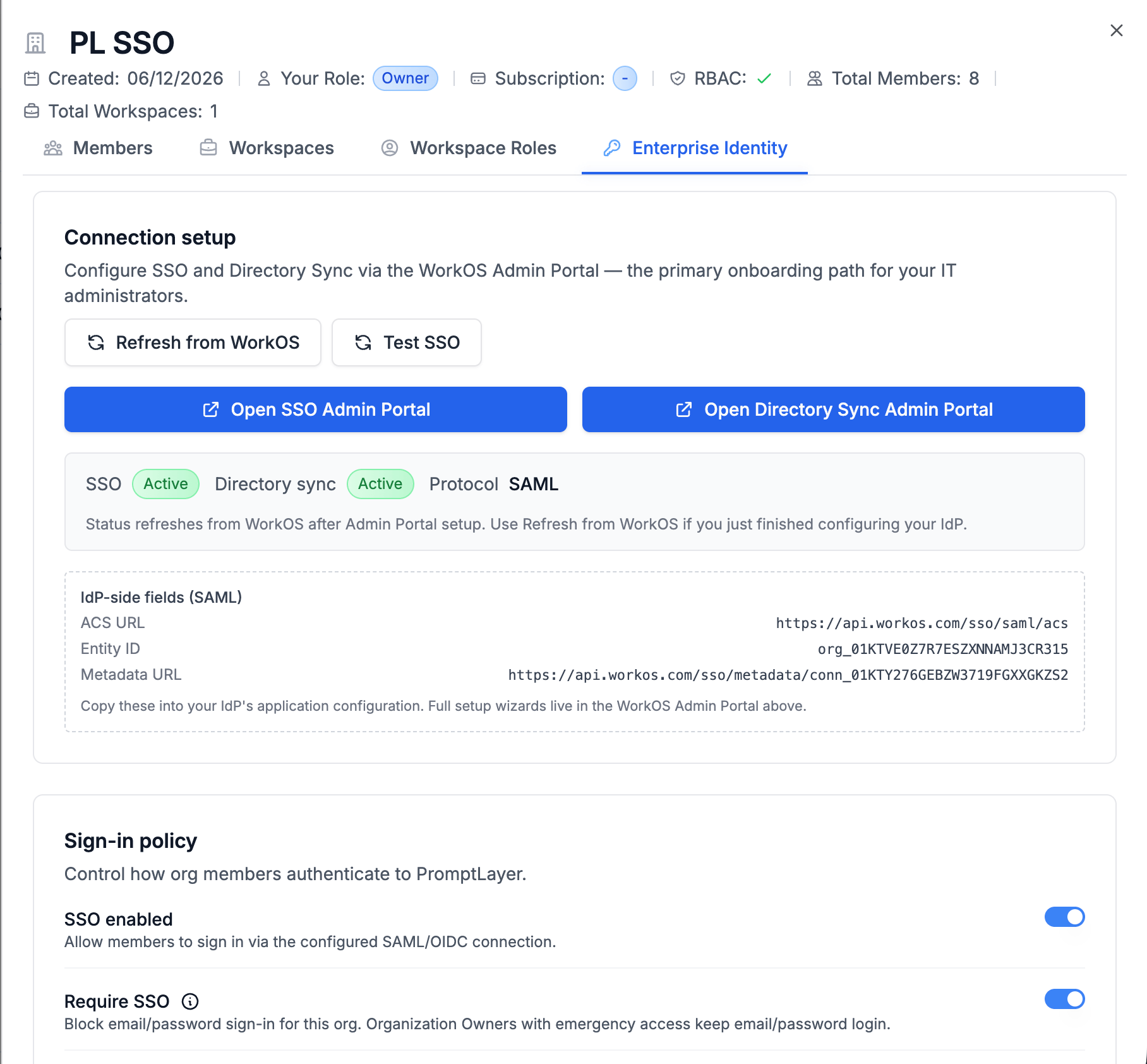 The **Enterprise Identity** tab includes connection setup, sign-in policy, group mappings, emergency access, default workspace, and the audit log.
## Enabling Enterprise Identity
Enterprise Identity is toggled per organization by PromptLayer operators (cloud) or your platform team (self-hosted). It is not a self-serve dashboard toggle.
When enabled for an organization:
1. PromptLayer creates **identity settings** for the org and links a **WorkOS organization**.
2. **RBAC is turned on** if it was off.
3. An **emergency access Owner** is auto-designated if none exists.
4. Existing sessions may be invalidated when sign-in policy changes (see [Sign-in policy & break-glass](/why-promptlayer/enterprise-identity/sign-in-security)).
After enablement, Owners configure SSO and Directory Sync in the dashboard. See [Setup guide](/why-promptlayer/enterprise-identity/setup).
Self-hosted deployments need WorkOS API credentials configured in the backend environment. Contact PromptLayer support for the required variables and webhook endpoints for your environment.
## Typical rollout
PromptLayer or your platform team enables the feature for your organization.
Open the WorkOS Admin Portal from **Organization Settings → Enterprise Identity**, configure your IdP, copy **Service provider details** from PromptLayer into your IdP, and run **Test SSO**. See [Setup](/why-promptlayer/enterprise-identity/setup).
Enable SSO, decide on JIT provisioning, and designate emergency access before turning on **Require SSO**. See [Sign-in policy & break-glass](/why-promptlayer/enterprise-identity/sign-in-security).
Enable SCIM in the WorkOS Admin Portal and assign groups in your IdP.
Create group mappings so IdP group membership grants the right workspace access. See [Provisioning & access](/why-promptlayer/enterprise-identity/provisioning).
Choose where JIT-provisioned users land when no group mapping applies.
Review SSO and SCIM events under **Enterprise Identity → Audit log**.
## User-facing flows
| Situation | What the user sees |
| ---------------------------------------------------- | ----------------------------------------------------------------------------------------------------------------------------------------------- |
| SSO sign-in succeeds, has workspace access | Normal PromptLayer dashboard |
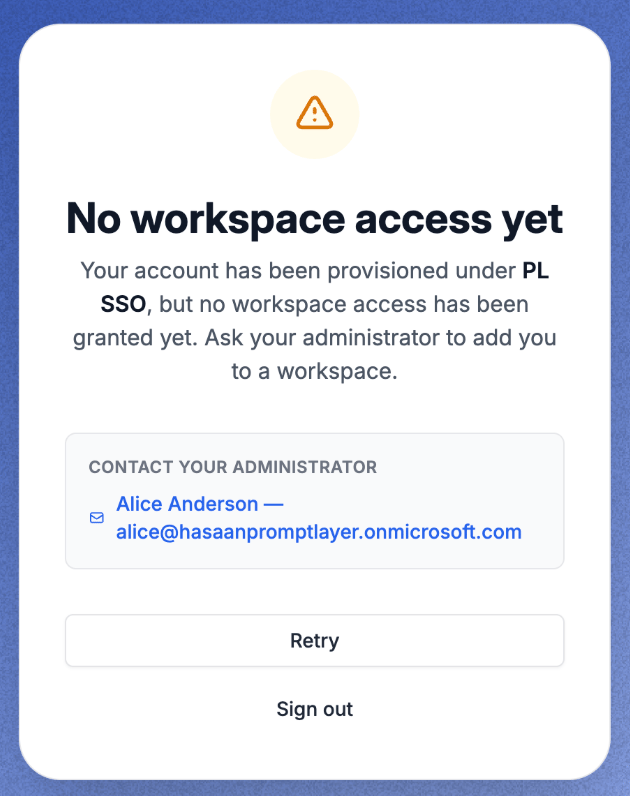
| SSO sign-in succeeds, JIT user with no mapping | [No workspace access](/why-promptlayer/enterprise-identity/provisioning#no-workspace-access) page with Owner contact and pending invites |
| Manual remove from last workspace | [No workspace access](/why-promptlayer/enterprise-identity/provisioning#no-workspace-access-after-manual-remove) page; org membership preserved |
| Email/password blocked by Require SSO | Message to sign in through SSO (Owners with emergency access excepted) |
| SCIM deactivation | Org membership soft-deleted; user loses access to that org's workspaces |
| Reactivation of same IdP identity after deactivation | Blocked — deprovisioned external identities cannot be restored under the same IdP identifier |
The **Enterprise Identity** tab includes connection setup, sign-in policy, group mappings, emergency access, default workspace, and the audit log.
## Enabling Enterprise Identity
Enterprise Identity is toggled per organization by PromptLayer operators (cloud) or your platform team (self-hosted). It is not a self-serve dashboard toggle.
When enabled for an organization:
1. PromptLayer creates **identity settings** for the org and links a **WorkOS organization**.
2. **RBAC is turned on** if it was off.
3. An **emergency access Owner** is auto-designated if none exists.
4. Existing sessions may be invalidated when sign-in policy changes (see [Sign-in policy & break-glass](/why-promptlayer/enterprise-identity/sign-in-security)).
After enablement, Owners configure SSO and Directory Sync in the dashboard. See [Setup guide](/why-promptlayer/enterprise-identity/setup).
Self-hosted deployments need WorkOS API credentials configured in the backend environment. Contact PromptLayer support for the required variables and webhook endpoints for your environment.
## Typical rollout
PromptLayer or your platform team enables the feature for your organization.
Open the WorkOS Admin Portal from **Organization Settings → Enterprise Identity**, configure your IdP, copy **Service provider details** from PromptLayer into your IdP, and run **Test SSO**. See [Setup](/why-promptlayer/enterprise-identity/setup).
Enable SSO, decide on JIT provisioning, and designate emergency access before turning on **Require SSO**. See [Sign-in policy & break-glass](/why-promptlayer/enterprise-identity/sign-in-security).
Enable SCIM in the WorkOS Admin Portal and assign groups in your IdP.
Create group mappings so IdP group membership grants the right workspace access. See [Provisioning & access](/why-promptlayer/enterprise-identity/provisioning).
Choose where JIT-provisioned users land when no group mapping applies.
Review SSO and SCIM events under **Enterprise Identity → Audit log**.
## User-facing flows
| Situation | What the user sees |
| ---------------------------------------------------- | ----------------------------------------------------------------------------------------------------------------------------------------------- |
| SSO sign-in succeeds, has workspace access | Normal PromptLayer dashboard |
| SSO sign-in succeeds, JIT user with no mapping | [No workspace access](/why-promptlayer/enterprise-identity/provisioning#no-workspace-access) page with Owner contact and pending invites |
| Manual remove from last workspace | [No workspace access](/why-promptlayer/enterprise-identity/provisioning#no-workspace-access-after-manual-remove) page; org membership preserved |
| Email/password blocked by Require SSO | Message to sign in through SSO (Owners with emergency access excepted) |
| SCIM deactivation | Org membership soft-deleted; user loses access to that org's workspaces |
| Reactivation of same IdP identity after deactivation | Blocked — deprovisioned external identities cannot be restored under the same IdP identifier |
 ## Related documentation
WorkOS Admin Portal, SAML/OIDC connection, service provider details, Directory Sync, and Test SSO.
JIT provisioning, group mappings, default workspace, and deprovisioning.
Require SSO, IdP MFA, emergency Owner access, and session invalidation.
Event types and operational triage.
Workspace roles and permissions that group mappings assign.
Org structure, Owners, and billing context.
## Related documentation
WorkOS Admin Portal, SAML/OIDC connection, service provider details, Directory Sync, and Test SSO.
JIT provisioning, group mappings, default workspace, and deprovisioning.
Require SSO, IdP MFA, emergency Owner access, and session invalidation.
Event types and operational triage.
Workspace roles and permissions that group mappings assign.
Org structure, Owners, and billing context.