> ## Documentation Index
> Fetch the complete documentation index at: https://docs.promptlayer.com/llms.txt
> Use this file to discover all available pages before exploring further.
# Choose a Deployment Strategy
> Choose from four integration patterns. Direct SDK calls, webhook caching, GitOps with CI/CD, or managed workflows.
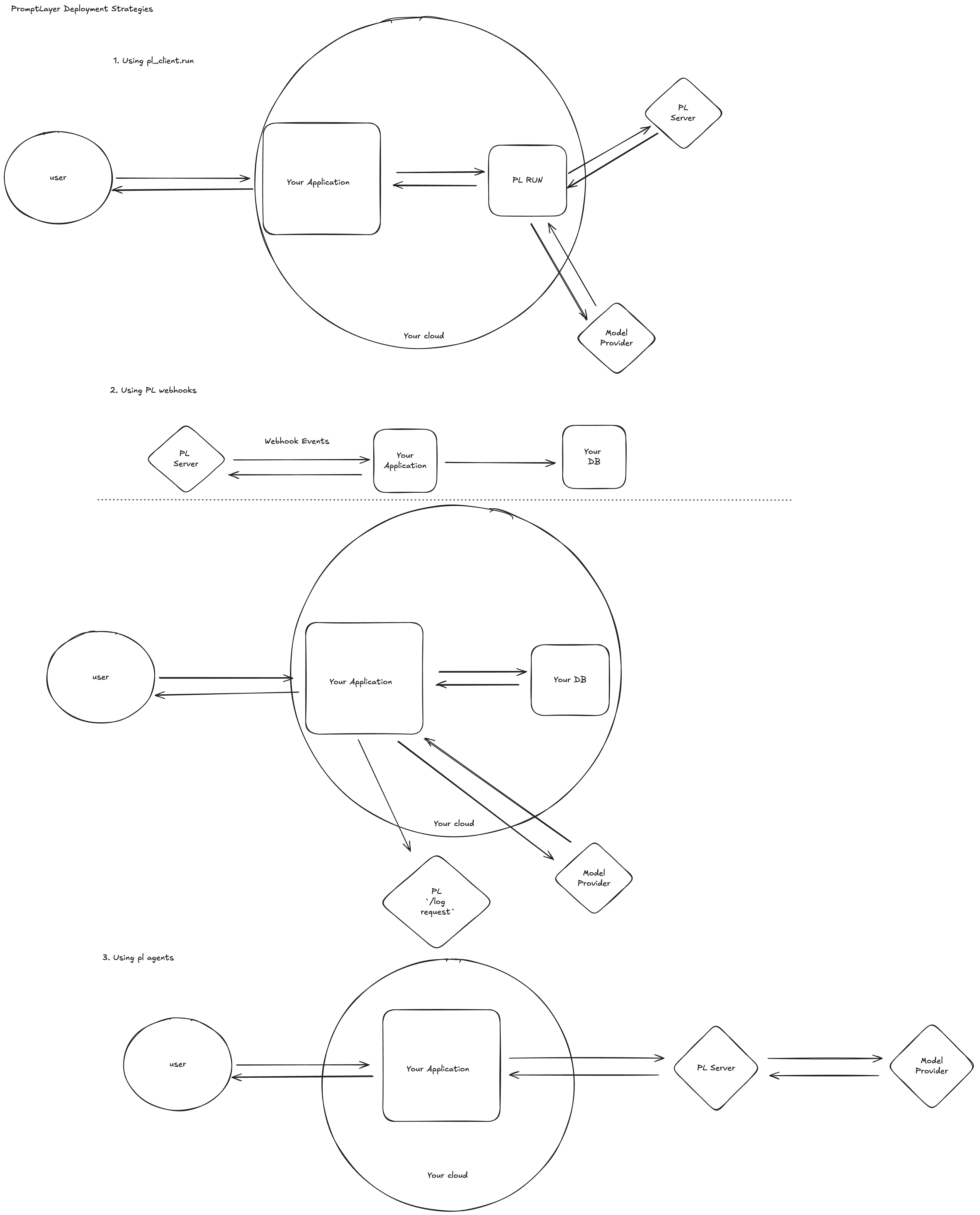
PromptLayer fits into your stack at four levels of sophistication:
1. **`promptlayer_client.run`** – zero-setup SDK sugar
2. **Webhook-driven caching** – maintain local cache of prompt templates
3. **GitOps with Webhooks** – keep Git as your source of truth with bi-directional sync
4. **Managed Workflows** – let PromptLayer orchestrate everything server-side
 ***
# Use `promptlayer_client.run` (quickest path)
When every millisecond of developer time counts, call `promptlayer_client.run()` directly from your application code.
```python Python theme={null}
from promptlayer import PromptLayer
pl_client = PromptLayer(api_key="...")
response = pl_client.run(
prompt_name="order-summary",
input_variables={"cart": cart_items},
prompt_release_label="prod"
)
```
```js JavaScript theme={null}
import { PromptLayer } from "promptlayer";
const plClient = new PromptLayer({ apiKey: "..." });
const response = await plClient.run({
promptName: "order-summary",
inputVariables: { cart: cartItems },
promptReleaseLabel: "prod"
});
```
**Under the hood**
1. Fetch latest prompt – We pull the template (by version or release label) from PromptLayer.
2. Execute – The SDK sends the populated prompt to OpenAI, Anthropic, Gemini, etc.
3. Log – The raw request/response pair is saved back to PromptLayer.---
# Cache prompts with Webhooks
Eliminate the extra round‑trip by **replicating prompts into your own cache or database**.
PromptLayer keeps that cache fresh through webhook events—no polling required.
```mermaid theme={null}
sequenceDiagram
autonumber
participant PL as PromptLayer Server
participant APP as Your Application
participant DB as Your Cache / DB
participant LLM as Model Provider
PL->>APP: "prompt.updated" webhook
APP->>DB: invalidate + store latest prompt
user->>APP: request needing AI
APP->>DB: fetch prompt
APP->>LLM: run prompt
APP-->>PL: async track.log (optional queue)
```
### Step‑by‑step
1. **Subscribe to webhooks in the UI**
Read more here about webhooks [here](/features/prompt-registry/webhooks).
2. **Maintain a local cache**
```python theme={null}
# pseudocode
def handle_pl_webhook(event):
prompt = event["data"]
db.prompts.upsert(prompt["prompt_template_name"], prompt)
```
3. **Serve traffic**
```python theme={null}
prompt = db.prompts.get("order-summary")
llm_response = openai.chat.completions.create(...)
queue.enqueue(track_to_promptlayer, llm_response)
```
> 💡 **Tip:** Most teams push the track\_to\_promptlayer onto a Redis or SQS queue so as to not block on the logging of a request.
Read the full guide: **[PromptLayer Webhooks ↗](/features/prompt-registry/webhooks)**
***
# GitOps with Webhooks
For teams that want **Git as the source of truth** for prompts, webhooks enable a full bi-directional sync between PromptLayer and your repository. This is the recommended pattern for teams with existing CI/CD pipelines (GitHub Actions, GitLab CI, etc.) that want prompt changes to go through the same review and deploy process as code changes.
### Change starts on PromptLayer
When someone edits a prompt or approves a release label in PromptLayer, a webhook fires to your system. Your webhook handler creates a merge request (or pull request) in your repo with the updated prompt. From there, your normal CI/CD pipeline takes over — code review, automated evals, deploy.
Key webhook events for this flow:
* `prompt_template_version_created` – a new version of a prompt was saved
* `prompt_template_label_moved` – a release label (e.g. `prod`) was moved to a new version
* `prompt_template_label_change_approved` – a protected release label change was approved
See the full list of events in the [Events docs](/features/prompt-registry/webhook-events).
```mermaid theme={null}
sequenceDiagram
autonumber
participant PL as PromptLayer
participant WH as Your Webhook Handler
participant GIT as GitLab / GitHub
participant CI as CI/CD Pipeline
PL->>WH: webhook (e.g. label approved)
WH->>GIT: create merge request with updated prompt
GIT->>CI: MR triggers CI pipeline
CI->>CI: run evals / tests
CI-->>PL: (optional) push eval results back via API
```
### Change starts in code
When an engineer updates a prompt directly in the repo, your CI/CD pipeline can publish it back to PromptLayer using the REST API or SDK. This keeps PromptLayer in sync without any manual steps.
```python Python theme={null}
from promptlayer import PromptLayer
pl_client = PromptLayer(api_key="...")
# In your CI/CD pipeline after prompt file changes
pl_client.templates.publish(
prompt_name="order-summary",
prompt_template="Your updated prompt template here",
)
```
```bash GitLab CI / GitHub Actions theme={null}
# Example CI step — publish prompt to PromptLayer
curl -X POST https://api.promptlayer.com/prompt-templates \
-H "X-API-KEY: $PROMPTLAYER_API_KEY" \
-H "Content-Type: application/json" \
-d @prompts/order-summary.json
```
### Closing the loop with eval results
If your CI/CD pipeline runs evaluations as part of the deploy process, you can push those results back to PromptLayer so everything is visible in one place. This means your team doesn't lose observability just because the deploy happened outside of PromptLayer.
> 💡 **Tip** – Combine this with [protected release labels](/features/prompt-registry/release-labels) and approval workflows so that a prompt change in PromptLayer requires approval before the webhook fires and the MR is created.
***
# Run fully-managed Workflows
For complex pipelines requiring orchestration, use PromptLayer's managed workflow infrastructure.
### How it works
1. Define multi-step workflows in PromptLayer's Workflow Builder
2. Trigger workflow execution via API
3. Monitor execution on PromptLayer servers
4. Receive results via webhook or polling
PromptLayer handles all orchestration, parallelization, and model provider communication.
### Implementation
```python Python theme={null}
from promptlayer import PromptLayer
promptlayer_client = PromptLayer(api_key="…")
execution = promptlayer_client.run_workflow( # SDK method
workflow_name="customer_support_workflow",
workflow_label_name="prod",
input_variables={"ticket_id": 123}
)
```
```ts JavaScript theme={null}
import { PromptLayer } from "promptlayer";
const promptlayer_client = new PromptLayer({ apiKey: "…" });
const execution = await promptlayer_client.runWorkflow({
workflowName: "customer_support_workflow",
workflowLabelName: "prod",
inputVariables: { ticket_id: 123 }
});
```
Because execution is server-side, you inherit centralized tracing, cost analytics, and secure sandboxed tool-nodes without extra ops.
Learn more: **[Workflows documentation ↗](/why-promptlayer/workflows)**
***
## Which pattern should I pick?
| Requirement | `promptlayer_client.run` | Webhook Cache | GitOps | Managed Workflow |
| --------------------------- | :----------------------: | :-----------: | :----: | :--------------: |
| ⏱️ *extreme latency reqs* | ❌ | ✅ | ➖ | ✅ |
| 🛠 *Single LLM call* | ✅ | ✅ | ✅ | ➖ |
| 🌩 *Complex plans / tools* | ➖ | ➖ | ➖ | ✅ |
| 👥 *Non-eng prompt editors* | ✅ | ✅ | ✅ | ✅ |
| 🧰 *Zero ops overhead* | ✅ | ➖ | ➖ | ✅ |
| 🔀 *Git as source of truth* | ➖ | ➖ | ✅ | ➖ |
| 🔁 *Bi-directional sync* | ➖ | ➖ | ✅ | ➖ |
***
## Further reading 📚
* **Quickstart** – [Your first prompt](/quickstart)
* **Webhooks** – [Events & signature verification](/features/prompt-registry/webhooks)
* **Workflows** – [Concepts & versioning](/why-promptlayer/workflows)
* **CI for prompts** – [Continuous Integration guide](/features/evaluations/continuous-integration)
***
> ✉️ **Need a hand?** Ping us in Discord or email [hello@promptlayer.com](mailto:hello@promptlayer.com)—happy to chat architecture!
***
# Use `promptlayer_client.run` (quickest path)
When every millisecond of developer time counts, call `promptlayer_client.run()` directly from your application code.
```python Python theme={null}
from promptlayer import PromptLayer
pl_client = PromptLayer(api_key="...")
response = pl_client.run(
prompt_name="order-summary",
input_variables={"cart": cart_items},
prompt_release_label="prod"
)
```
```js JavaScript theme={null}
import { PromptLayer } from "promptlayer";
const plClient = new PromptLayer({ apiKey: "..." });
const response = await plClient.run({
promptName: "order-summary",
inputVariables: { cart: cartItems },
promptReleaseLabel: "prod"
});
```
**Under the hood**
1. Fetch latest prompt – We pull the template (by version or release label) from PromptLayer.
2. Execute – The SDK sends the populated prompt to OpenAI, Anthropic, Gemini, etc.
3. Log – The raw request/response pair is saved back to PromptLayer.---
# Cache prompts with Webhooks
Eliminate the extra round‑trip by **replicating prompts into your own cache or database**.
PromptLayer keeps that cache fresh through webhook events—no polling required.
```mermaid theme={null}
sequenceDiagram
autonumber
participant PL as PromptLayer Server
participant APP as Your Application
participant DB as Your Cache / DB
participant LLM as Model Provider
PL->>APP: "prompt.updated" webhook
APP->>DB: invalidate + store latest prompt
user->>APP: request needing AI
APP->>DB: fetch prompt
APP->>LLM: run prompt
APP-->>PL: async track.log (optional queue)
```
### Step‑by‑step
1. **Subscribe to webhooks in the UI**
Read more here about webhooks [here](/features/prompt-registry/webhooks).
2. **Maintain a local cache**
```python theme={null}
# pseudocode
def handle_pl_webhook(event):
prompt = event["data"]
db.prompts.upsert(prompt["prompt_template_name"], prompt)
```
3. **Serve traffic**
```python theme={null}
prompt = db.prompts.get("order-summary")
llm_response = openai.chat.completions.create(...)
queue.enqueue(track_to_promptlayer, llm_response)
```
> 💡 **Tip:** Most teams push the track\_to\_promptlayer onto a Redis or SQS queue so as to not block on the logging of a request.
Read the full guide: **[PromptLayer Webhooks ↗](/features/prompt-registry/webhooks)**
***
# GitOps with Webhooks
For teams that want **Git as the source of truth** for prompts, webhooks enable a full bi-directional sync between PromptLayer and your repository. This is the recommended pattern for teams with existing CI/CD pipelines (GitHub Actions, GitLab CI, etc.) that want prompt changes to go through the same review and deploy process as code changes.
### Change starts on PromptLayer
When someone edits a prompt or approves a release label in PromptLayer, a webhook fires to your system. Your webhook handler creates a merge request (or pull request) in your repo with the updated prompt. From there, your normal CI/CD pipeline takes over — code review, automated evals, deploy.
Key webhook events for this flow:
* `prompt_template_version_created` – a new version of a prompt was saved
* `prompt_template_label_moved` – a release label (e.g. `prod`) was moved to a new version
* `prompt_template_label_change_approved` – a protected release label change was approved
See the full list of events in the [Events docs](/features/prompt-registry/webhook-events).
```mermaid theme={null}
sequenceDiagram
autonumber
participant PL as PromptLayer
participant WH as Your Webhook Handler
participant GIT as GitLab / GitHub
participant CI as CI/CD Pipeline
PL->>WH: webhook (e.g. label approved)
WH->>GIT: create merge request with updated prompt
GIT->>CI: MR triggers CI pipeline
CI->>CI: run evals / tests
CI-->>PL: (optional) push eval results back via API
```
### Change starts in code
When an engineer updates a prompt directly in the repo, your CI/CD pipeline can publish it back to PromptLayer using the REST API or SDK. This keeps PromptLayer in sync without any manual steps.
```python Python theme={null}
from promptlayer import PromptLayer
pl_client = PromptLayer(api_key="...")
# In your CI/CD pipeline after prompt file changes
pl_client.templates.publish(
prompt_name="order-summary",
prompt_template="Your updated prompt template here",
)
```
```bash GitLab CI / GitHub Actions theme={null}
# Example CI step — publish prompt to PromptLayer
curl -X POST https://api.promptlayer.com/prompt-templates \
-H "X-API-KEY: $PROMPTLAYER_API_KEY" \
-H "Content-Type: application/json" \
-d @prompts/order-summary.json
```
### Closing the loop with eval results
If your CI/CD pipeline runs evaluations as part of the deploy process, you can push those results back to PromptLayer so everything is visible in one place. This means your team doesn't lose observability just because the deploy happened outside of PromptLayer.
> 💡 **Tip** – Combine this with [protected release labels](/features/prompt-registry/release-labels) and approval workflows so that a prompt change in PromptLayer requires approval before the webhook fires and the MR is created.
***
# Run fully-managed Workflows
For complex pipelines requiring orchestration, use PromptLayer's managed workflow infrastructure.
### How it works
1. Define multi-step workflows in PromptLayer's Workflow Builder
2. Trigger workflow execution via API
3. Monitor execution on PromptLayer servers
4. Receive results via webhook or polling
PromptLayer handles all orchestration, parallelization, and model provider communication.
### Implementation
```python Python theme={null}
from promptlayer import PromptLayer
promptlayer_client = PromptLayer(api_key="…")
execution = promptlayer_client.run_workflow( # SDK method
workflow_name="customer_support_workflow",
workflow_label_name="prod",
input_variables={"ticket_id": 123}
)
```
```ts JavaScript theme={null}
import { PromptLayer } from "promptlayer";
const promptlayer_client = new PromptLayer({ apiKey: "…" });
const execution = await promptlayer_client.runWorkflow({
workflowName: "customer_support_workflow",
workflowLabelName: "prod",
inputVariables: { ticket_id: 123 }
});
```
Because execution is server-side, you inherit centralized tracing, cost analytics, and secure sandboxed tool-nodes without extra ops.
Learn more: **[Workflows documentation ↗](/why-promptlayer/workflows)**
***
## Which pattern should I pick?
| Requirement | `promptlayer_client.run` | Webhook Cache | GitOps | Managed Workflow |
| --------------------------- | :----------------------: | :-----------: | :----: | :--------------: |
| ⏱️ *extreme latency reqs* | ❌ | ✅ | ➖ | ✅ |
| 🛠 *Single LLM call* | ✅ | ✅ | ✅ | ➖ |
| 🌩 *Complex plans / tools* | ➖ | ➖ | ➖ | ✅ |
| 👥 *Non-eng prompt editors* | ✅ | ✅ | ✅ | ✅ |
| 🧰 *Zero ops overhead* | ✅ | ➖ | ➖ | ✅ |
| 🔀 *Git as source of truth* | ➖ | ➖ | ✅ | ➖ |
| 🔁 *Bi-directional sync* | ➖ | ➖ | ✅ | ➖ |
***
## Further reading 📚
* **Quickstart** – [Your first prompt](/quickstart)
* **Webhooks** – [Events & signature verification](/features/prompt-registry/webhooks)
* **Workflows** – [Concepts & versioning](/why-promptlayer/workflows)
* **CI for prompts** – [Continuous Integration guide](/features/evaluations/continuous-integration)
***
> ✉️ **Need a hand?** Ping us in Discord or email [hello@promptlayer.com](mailto:hello@promptlayer.com)—happy to chat architecture!