> ## Documentation Index
> Fetch the complete documentation index at: https://docs.promptlayer.com/llms.txt
> Use this file to discover all available pages before exploring further.
# Backtest Prompt Changes
> Test a new prompt version against historical request data before releasing it.
Legacy Evaluations, Reports, and Datasets are deprecated for new workflows. Use [Tables](/features/tables/overview) for new evaluation, dataset, report, backtesting, and batch workflows. See [Migrate from Evaluations and Datasets](/features/tables/migrate-from-evaluations-and-datasets).
Backtesting lets you run a new prompt version against real historical inputs. Use it when you want to understand how a prompt change would have affected production or staging traffic.
## Create a historical dataset
Go to **Datasets** and click **Add from Request History**. This opens a request log browser where you can filter and select requests.
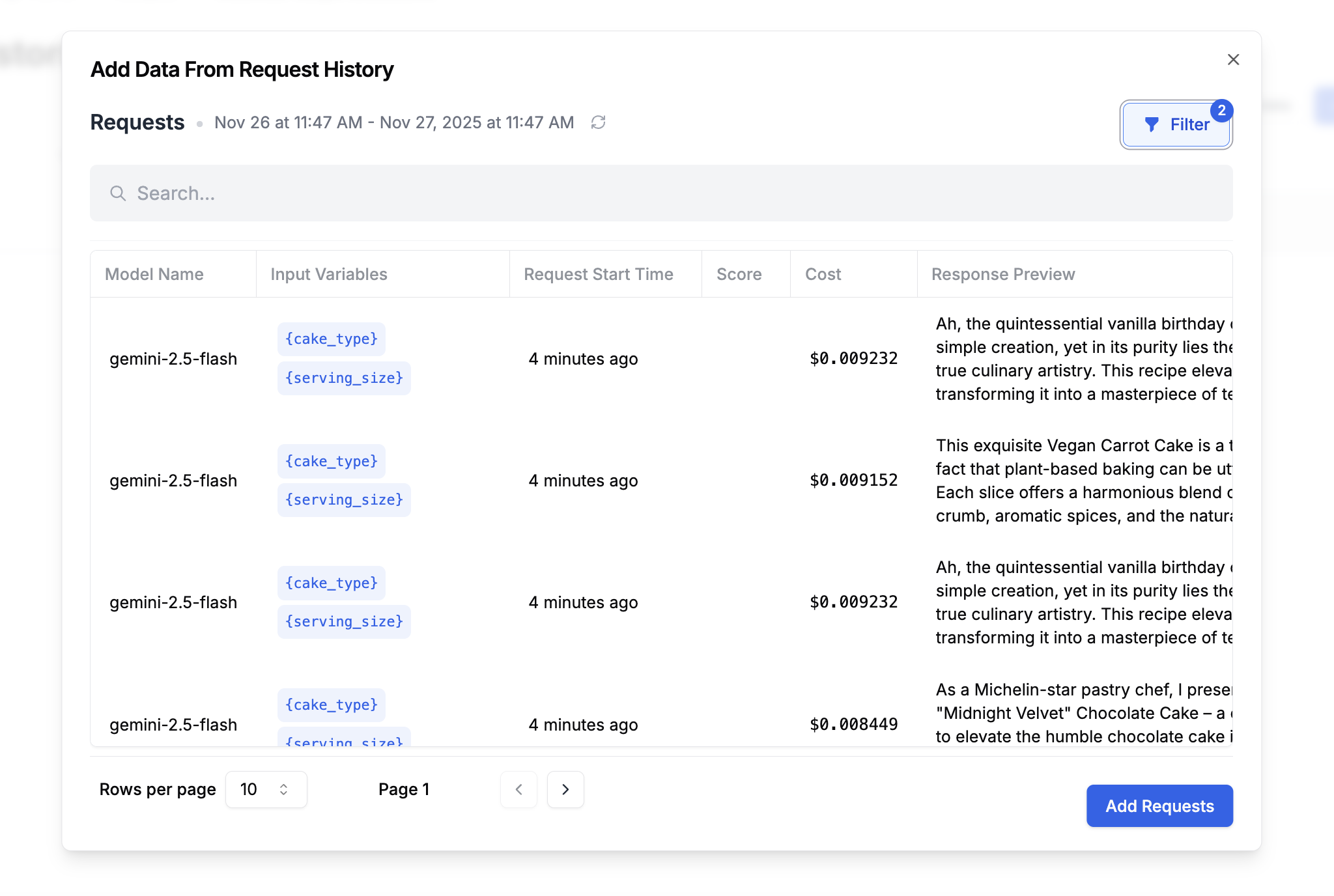 Filter by prompt name, date range, metadata, score, tag, or request content. Select the requests you want and click **Add Requests**.
The dataset captures the real inputs users sent, along with the outputs your current prompt produced.
## Run a backtest
Create an evaluation that runs your new prompt version against the historical dataset.
Add columns for:
* **New prompt output**: The response from your updated prompt version
* **Comparison**: An equality comparison, semantic similarity check, LLM-as-judge score, or human review column
Filter by prompt name, date range, metadata, score, tag, or request content. Select the requests you want and click **Add Requests**.
The dataset captures the real inputs users sent, along with the outputs your current prompt produced.
## Run a backtest
Create an evaluation that runs your new prompt version against the historical dataset.
Add columns for:
* **New prompt output**: The response from your updated prompt version
* **Comparison**: An equality comparison, semantic similarity check, LLM-as-judge score, or human review column
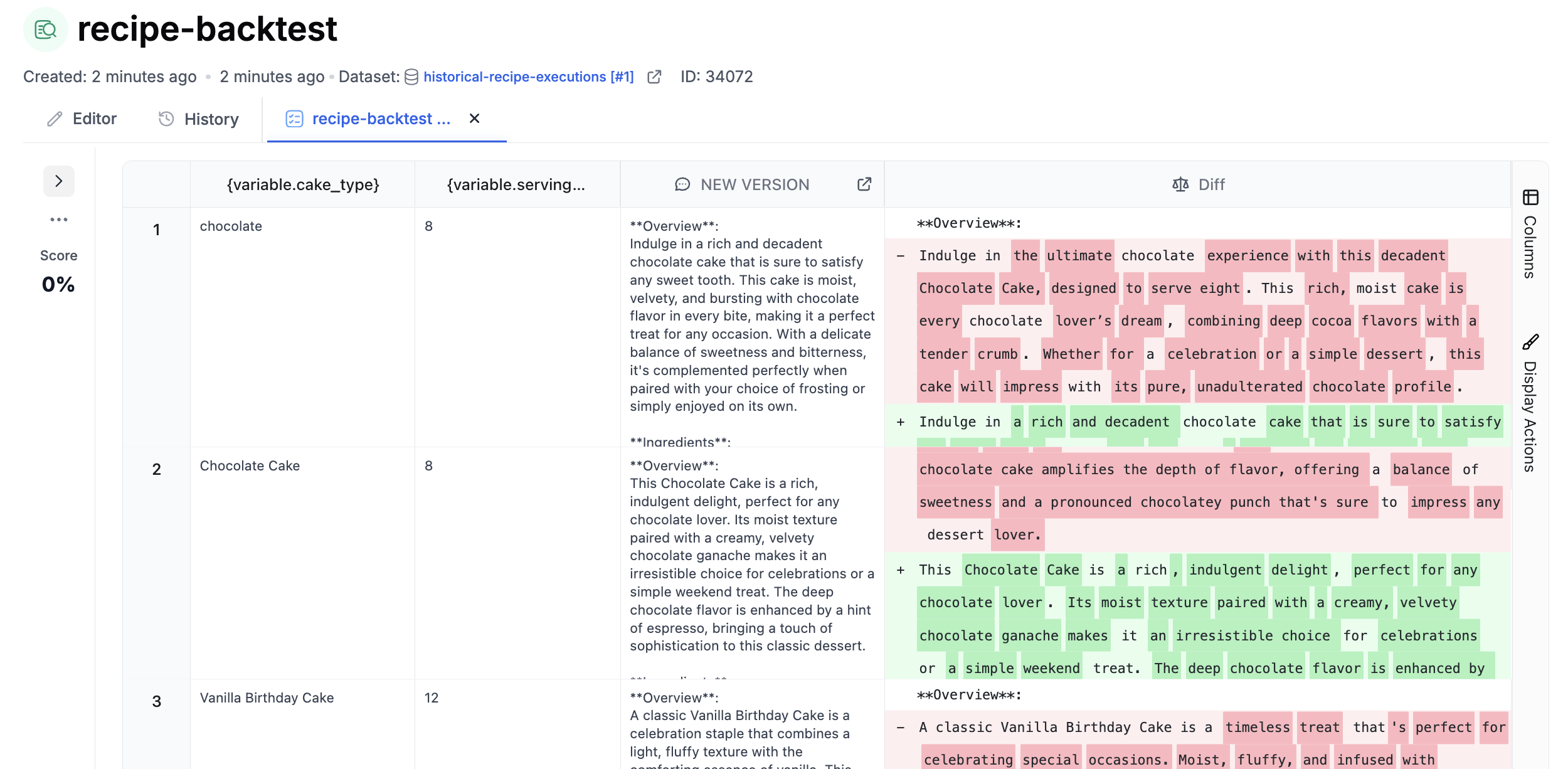 Review the differences before assigning a production release label to the new version.
## Automate backtests
Attach the backtest evaluation to your prompt so it runs when you save a new version. This creates a regression check before the change reaches production.
Learn more in [Continuous Integration](/features/evaluations/continuous-integration).
## Next steps
* [Create datasets from history](/features/evaluations/datasets-create-from-history)
* [Evaluation pipelines](/features/evaluations/building-pipelines)
* [Release labels](/features/prompt-registry/release-labels)
Review the differences before assigning a production release label to the new version.
## Automate backtests
Attach the backtest evaluation to your prompt so it runs when you save a new version. This creates a regression check before the change reaches production.
Learn more in [Continuous Integration](/features/evaluations/continuous-integration).
## Next steps
* [Create datasets from history](/features/evaluations/datasets-create-from-history)
* [Evaluation pipelines](/features/evaluations/building-pipelines)
* [Release labels](/features/prompt-registry/release-labels)