> ## Documentation Index
> Fetch the complete documentation index at: https://docs.promptlayer.com/llms.txt
> Use this file to discover all available pages before exploring further.
# Scoring
> Configure sheet scores with score columns, Boolean and numeric scoring, custom code, and winner aggregation.
Scoring turns a sheet into a summary signal you can compare across runs, prompt versions, and workflow changes.
Click **Score** in the Table toolbar to open the score panel after computed columns produce the outputs or checks you care about.
 ## Score panel
The score panel shows the current result, column and sub-score breakdowns, configuration, and recalculation status.
## Score panel
The score panel shows the current result, column and sub-score breakdowns, configuration, and recalculation status.
 ## Configure scoring
In **Scoring configuration**, choose a scoring mode and the columns that count toward the score.
## Configure scoring
In **Scoring configuration**, choose a scoring mode and the columns that count toward the score.
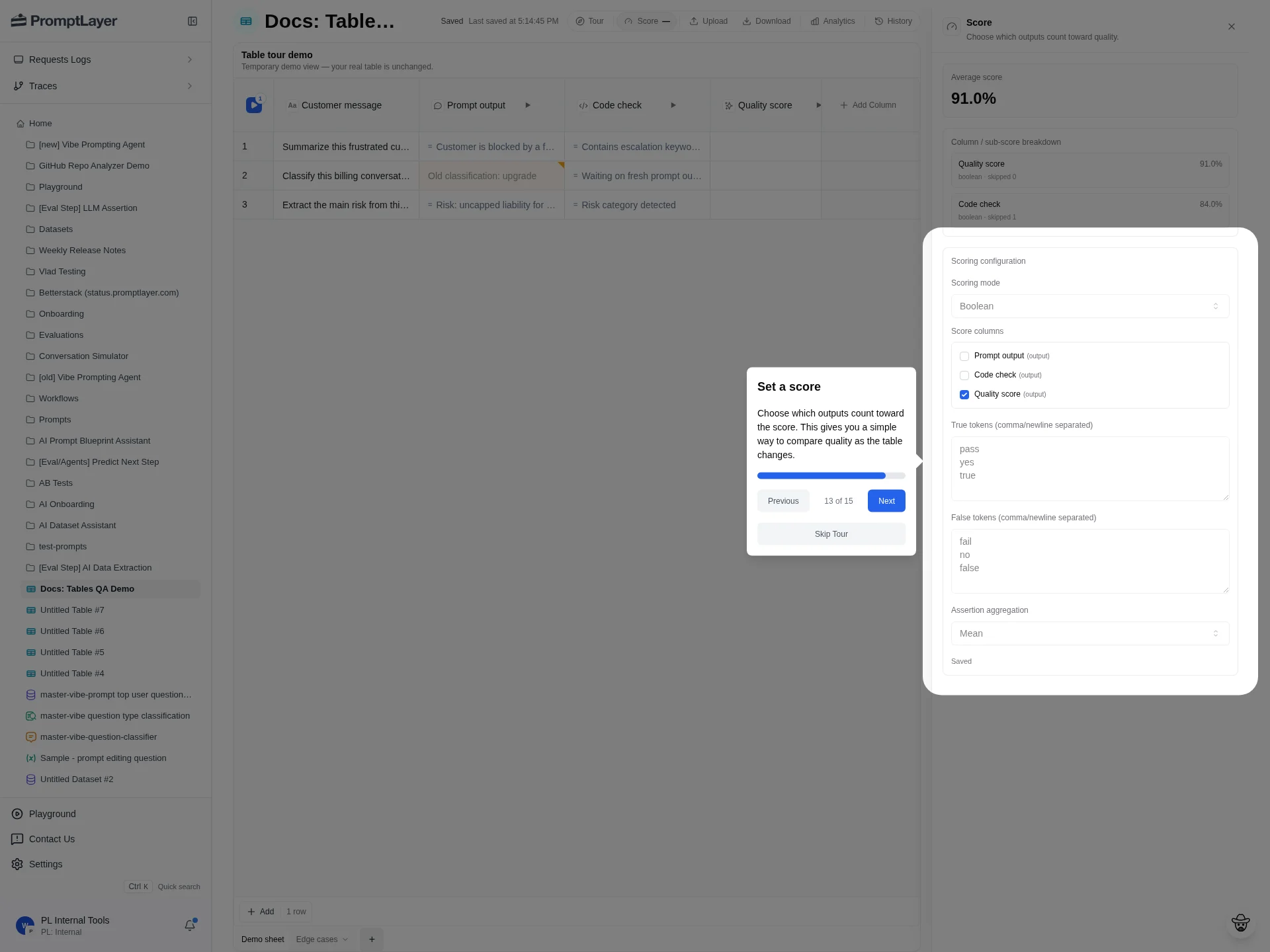 For non-custom, non-aggregate modes, choose **Score columns**. Changes save automatically; use **Recalculate** after changing score settings.
## Scoring modes
| Mode | Use when | Configuration |
| -------------------------------- | ------------------------------------------------------------------------------------------- | ------------------------------------------------------------------------------- |
| **Auto detect (boolean/number)** | The selected score columns already produce booleans or numbers. | Select score columns and recalculate. |
| **Boolean** | Selected columns produce pass/fail style outputs. | Configure true tokens, false tokens, and assertion aggregation. |
| **Numeric** | Selected columns produce numeric values. | Select score columns and recalculate. |
| **Custom code** | You need custom scoring logic across the sheet. | Write Python or JavaScript that returns a deterministic scoring object. |
| **Winner / aggregate** | You want a qualitative result such as most frequent winner, lowest value, or highest value. | Choose an aggregate question, source column, and optional display label column. |
## Boolean scoring
Boolean mode converts selected column values into pass/fail results. Configure true tokens, false tokens, and assertion aggregation (`Mean`, `All`, or `Any`).
Use Boolean scoring for assertion columns, quality checks, moderation checks, format checks, and other pass/fail evaluations.
## Numeric scoring
Numeric mode averages selected numeric outputs. Use it when columns return scores, distances, similarity values, ratings, or normalized metrics.
For comparable version history, make sure higher values consistently mean better quality.
## Auto detect scoring
Auto detect chooses boolean or numeric handling based on the selected score column outputs. Use it when the selected columns are already clean booleans or numbers and you do not need custom token rules.
## Custom code scoring
Custom code mode scores the whole sheet with Python or JavaScript. The scorer receives sheet data and must return a deterministic object with a numeric `score`.
Required key:
```json theme={null}
{
"score": 0.91
}
```
Optional keys:
```json theme={null}
{
"score": 0.91,
"sub_scores": {
"coverage": 0.96,
"quality": 0.88
},
"score_matrix": [[0.91, "pass"]]
}
```
Supported `score_matrix` shapes:
* 2D matrix: `list[list[cell]]`.
* Single-table 3D matrix: `list[list[list[cell]]]` where the top-level length is `1`.
Matrix cells can be numbers, strings, `null`, or objects like `{ "value": 0.92, "positive_metric": true }`.
Use custom code when score logic depends on multiple columns, row-level weighting, custom sub-scores, or a custom matrix display.
## Winner and aggregate scoring
Winner / aggregate mode summarizes one column into a qualitative result.
Available questions:
| Question | Use when |
| ----------------------- | ---------------------------------------------------------------------------------- |
| **Most frequent value** | You want the value that appears most often, such as the most common winning model. |
| **Lowest value** | You want the row with the smallest numeric value, such as lowest cost or latency. |
| **Highest value** | You want the row with the largest numeric value, such as highest quality score. |
Choose the source **Column**. For lowest or highest value, optionally choose **Show winner as** to display a label from the same row instead of only the metric value.
Use aggregate scoring for model bakeoffs, latency comparisons, cost comparisons, routing decisions, or any sheet where the result is a winner rather than an average.
## Read the score
Use the score summary to compare the average score or aggregate result, inspect column and sub-score breakdowns, and see skipped values or recalculation errors.
## Recalculate after changes
Recalculate the score after:
* Changing the scoring mode.
* Changing score columns.
* Updating true or false tokens.
* Editing custom scorer code.
* Changing aggregate settings.
* Rerunning computed cells that feed the score.
## API references
Read the current score result.
Configure scoring for a sheet.
Queue a score recalculation.
Read score history for a sheet.
For non-custom, non-aggregate modes, choose **Score columns**. Changes save automatically; use **Recalculate** after changing score settings.
## Scoring modes
| Mode | Use when | Configuration |
| -------------------------------- | ------------------------------------------------------------------------------------------- | ------------------------------------------------------------------------------- |
| **Auto detect (boolean/number)** | The selected score columns already produce booleans or numbers. | Select score columns and recalculate. |
| **Boolean** | Selected columns produce pass/fail style outputs. | Configure true tokens, false tokens, and assertion aggregation. |
| **Numeric** | Selected columns produce numeric values. | Select score columns and recalculate. |
| **Custom code** | You need custom scoring logic across the sheet. | Write Python or JavaScript that returns a deterministic scoring object. |
| **Winner / aggregate** | You want a qualitative result such as most frequent winner, lowest value, or highest value. | Choose an aggregate question, source column, and optional display label column. |
## Boolean scoring
Boolean mode converts selected column values into pass/fail results. Configure true tokens, false tokens, and assertion aggregation (`Mean`, `All`, or `Any`).
Use Boolean scoring for assertion columns, quality checks, moderation checks, format checks, and other pass/fail evaluations.
## Numeric scoring
Numeric mode averages selected numeric outputs. Use it when columns return scores, distances, similarity values, ratings, or normalized metrics.
For comparable version history, make sure higher values consistently mean better quality.
## Auto detect scoring
Auto detect chooses boolean or numeric handling based on the selected score column outputs. Use it when the selected columns are already clean booleans or numbers and you do not need custom token rules.
## Custom code scoring
Custom code mode scores the whole sheet with Python or JavaScript. The scorer receives sheet data and must return a deterministic object with a numeric `score`.
Required key:
```json theme={null}
{
"score": 0.91
}
```
Optional keys:
```json theme={null}
{
"score": 0.91,
"sub_scores": {
"coverage": 0.96,
"quality": 0.88
},
"score_matrix": [[0.91, "pass"]]
}
```
Supported `score_matrix` shapes:
* 2D matrix: `list[list[cell]]`.
* Single-table 3D matrix: `list[list[list[cell]]]` where the top-level length is `1`.
Matrix cells can be numbers, strings, `null`, or objects like `{ "value": 0.92, "positive_metric": true }`.
Use custom code when score logic depends on multiple columns, row-level weighting, custom sub-scores, or a custom matrix display.
## Winner and aggregate scoring
Winner / aggregate mode summarizes one column into a qualitative result.
Available questions:
| Question | Use when |
| ----------------------- | ---------------------------------------------------------------------------------- |
| **Most frequent value** | You want the value that appears most often, such as the most common winning model. |
| **Lowest value** | You want the row with the smallest numeric value, such as lowest cost or latency. |
| **Highest value** | You want the row with the largest numeric value, such as highest quality score. |
Choose the source **Column**. For lowest or highest value, optionally choose **Show winner as** to display a label from the same row instead of only the metric value.
Use aggregate scoring for model bakeoffs, latency comparisons, cost comparisons, routing decisions, or any sheet where the result is a winner rather than an average.
## Read the score
Use the score summary to compare the average score or aggregate result, inspect column and sub-score breakdowns, and see skipped values or recalculation errors.
## Recalculate after changes
Recalculate the score after:
* Changing the scoring mode.
* Changing score columns.
* Updating true or false tokens.
* Editing custom scorer code.
* Changing aggregate settings.
* Rerunning computed cells that feed the score.
## API references
Read the current score result.
Configure scoring for a sheet.
Queue a score recalculation.
Read score history for a sheet.