> ## Documentation Index
> Fetch the complete documentation index at: https://docs.promptlayer.com/llms.txt
> Use this file to discover all available pages before exploring further.
# Scorecards
> Version, run, and monitor table evaluations with reusable criteria, row-level results, and evidence.
Teams ship prompts quickly, then hit a quality wall. Results drift. Edge cases slip in. Regressions reach users before anyone sees the pattern.
Scorecards give a sheet a repeatable evaluation contract. You define the checks that matter, run them against rows, and review the exact failures with evidence.
## Open the scorecard panel
Open a table and click the score badge in the toolbar. The scorecard panel shows the current aggregate score, verdict, last calculation time, row evaluator status, and failing criteria.
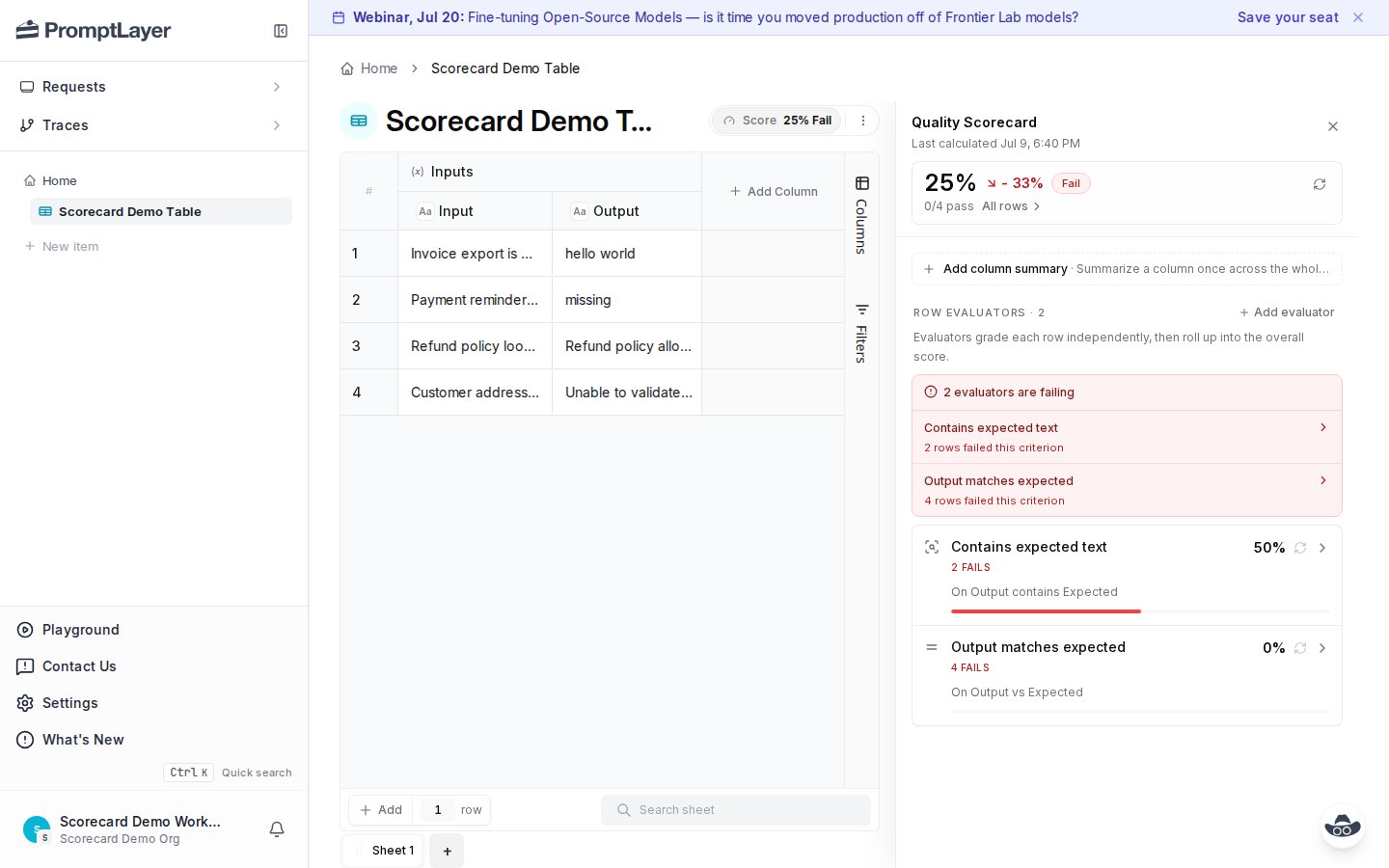 The top score is the sheet-level result. Each evaluator contributes to that result based on its weight and thresholds. A failed required evaluator can fail the full scorecard, depending on the aggregation settings.
## Add evaluators
Click **Add evaluator** to choose how each row should be graded.
The top score is the sheet-level result. Each evaluator contributes to that result based on its weight and thresholds. A failed required evaluator can fail the full scorecard, depending on the aggregation settings.
## Add evaluators
Click **Add evaluator** to choose how each row should be graded.
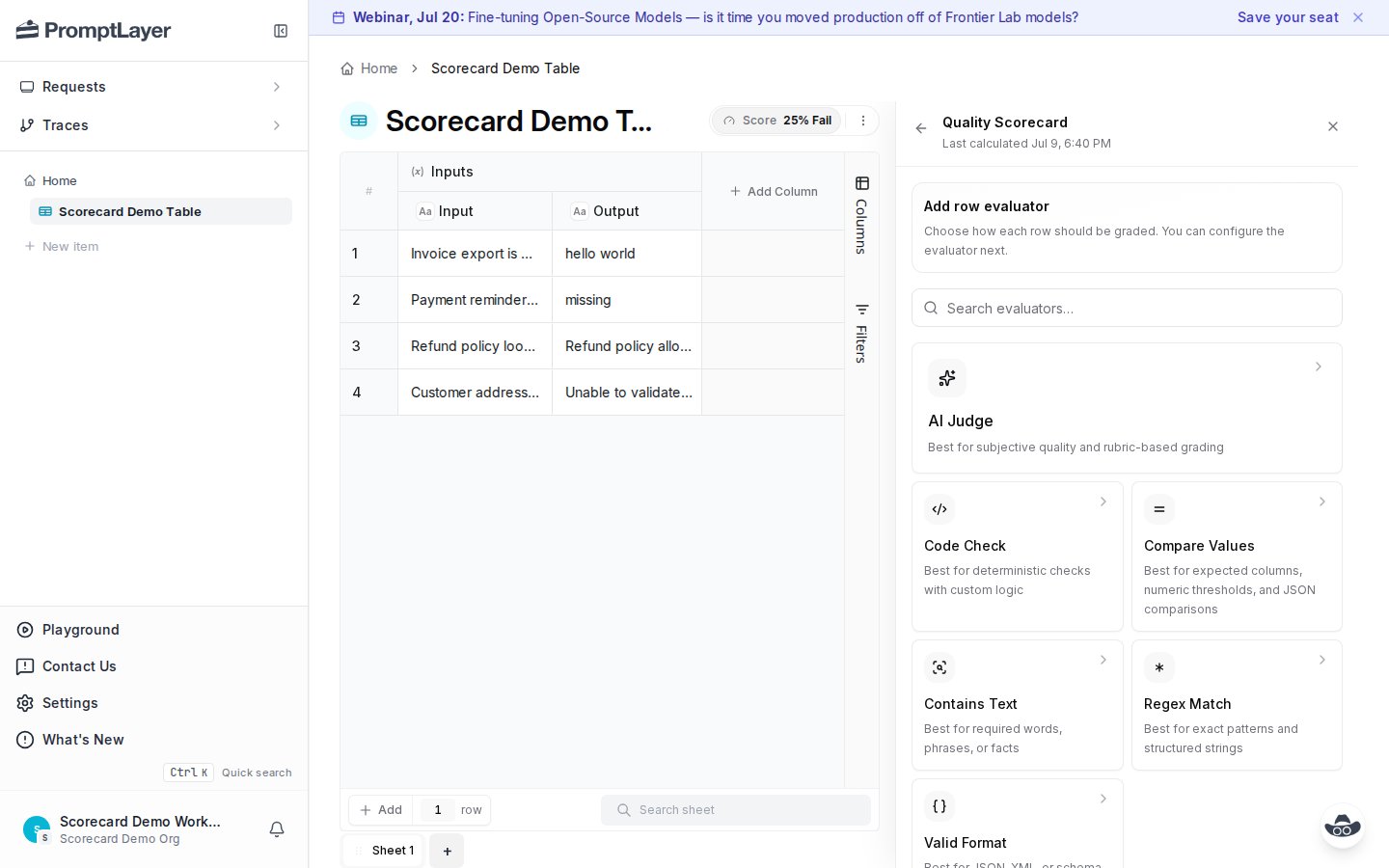 Available evaluator types include:
| Evaluator | Use when |
| ------------------ | ----------------------------------------------------------------------- |
| **AI Judge** | You need rubric-based grading for subjective output quality. |
| **Code Check** | You need deterministic checks with custom logic. |
| **Compare Values** | You need expected column, numeric threshold, or JSON comparison checks. |
| **Contains Text** | You need required words, phrases, or facts. |
| **Regex Match** | You need exact pattern checks for structured strings. |
| **Valid Format** | You need JSON, XML, or schema-style validation. |
You can also add a column summary. Column summaries run once across the whole column. Row evaluators run once per row, then roll up into the overall score.
## Configure an evaluator
Each evaluator has a name, source columns, matching rules, thresholds, and weight. In this example, **Contains Text** checks whether the `Output` column contains the expected value from another column.
Available evaluator types include:
| Evaluator | Use when |
| ------------------ | ----------------------------------------------------------------------- |
| **AI Judge** | You need rubric-based grading for subjective output quality. |
| **Code Check** | You need deterministic checks with custom logic. |
| **Compare Values** | You need expected column, numeric threshold, or JSON comparison checks. |
| **Contains Text** | You need required words, phrases, or facts. |
| **Regex Match** | You need exact pattern checks for structured strings. |
| **Valid Format** | You need JSON, XML, or schema-style validation. |
You can also add a column summary. Column summaries run once across the whole column. Row evaluators run once per row, then roll up into the overall score.
## Configure an evaluator
Each evaluator has a name, source columns, matching rules, thresholds, and weight. In this example, **Contains Text** checks whether the `Output` column contains the expected value from another column.
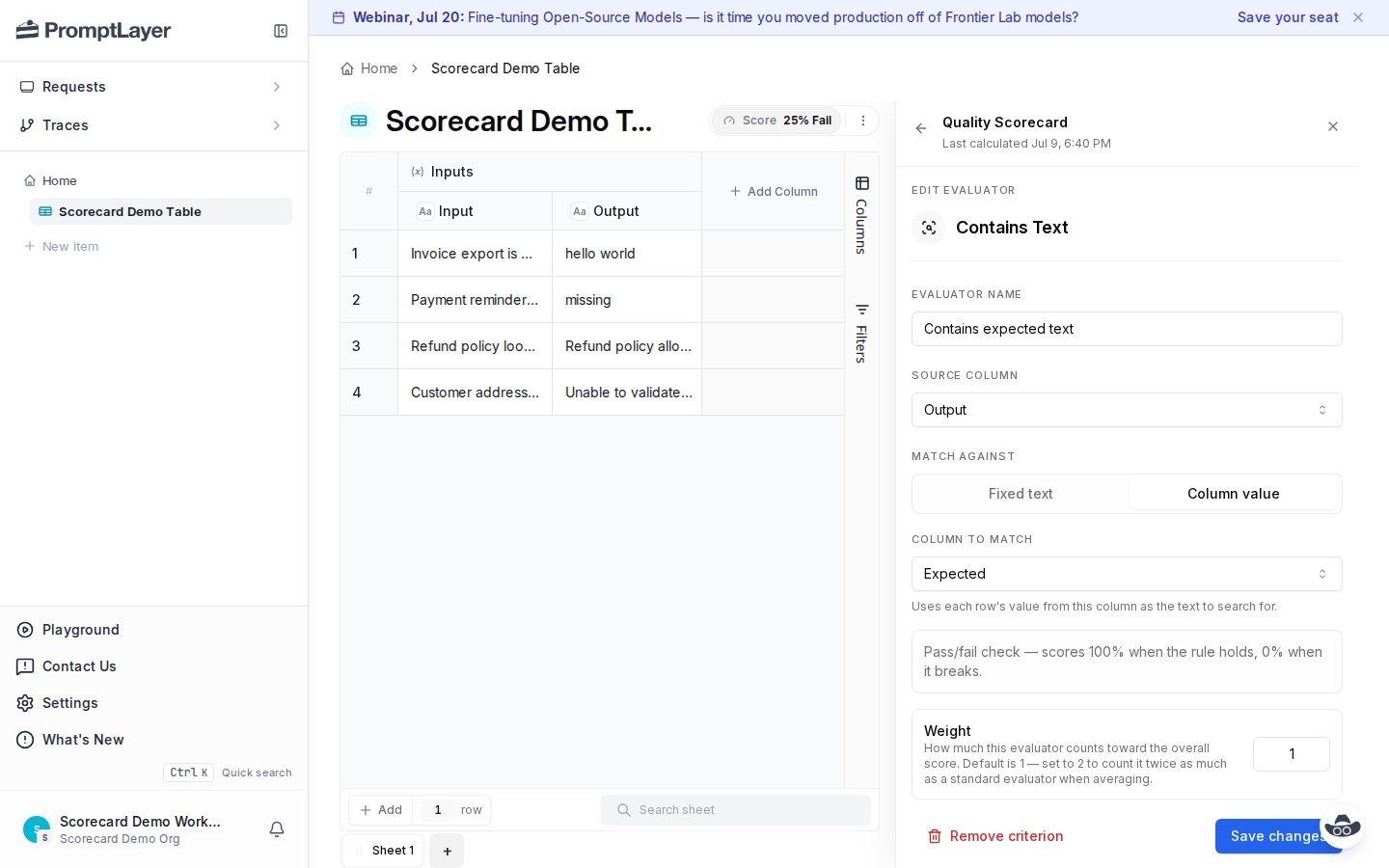 Use weights to make important checks count more. A weight of `2` counts twice as much as a standard evaluator when scores are averaged.
## Review all rows
After a calculation finishes, open **All rows** to find failures fast. Filter by verdict, search rows, then open a row to see why it failed.
Use weights to make important checks count more. A weight of `2` counts twice as much as a standard evaluator when scores are averaged.
## Review all rows
After a calculation finishes, open **All rows** to find failures fast. Filter by verdict, search rows, then open a row to see why it failed.
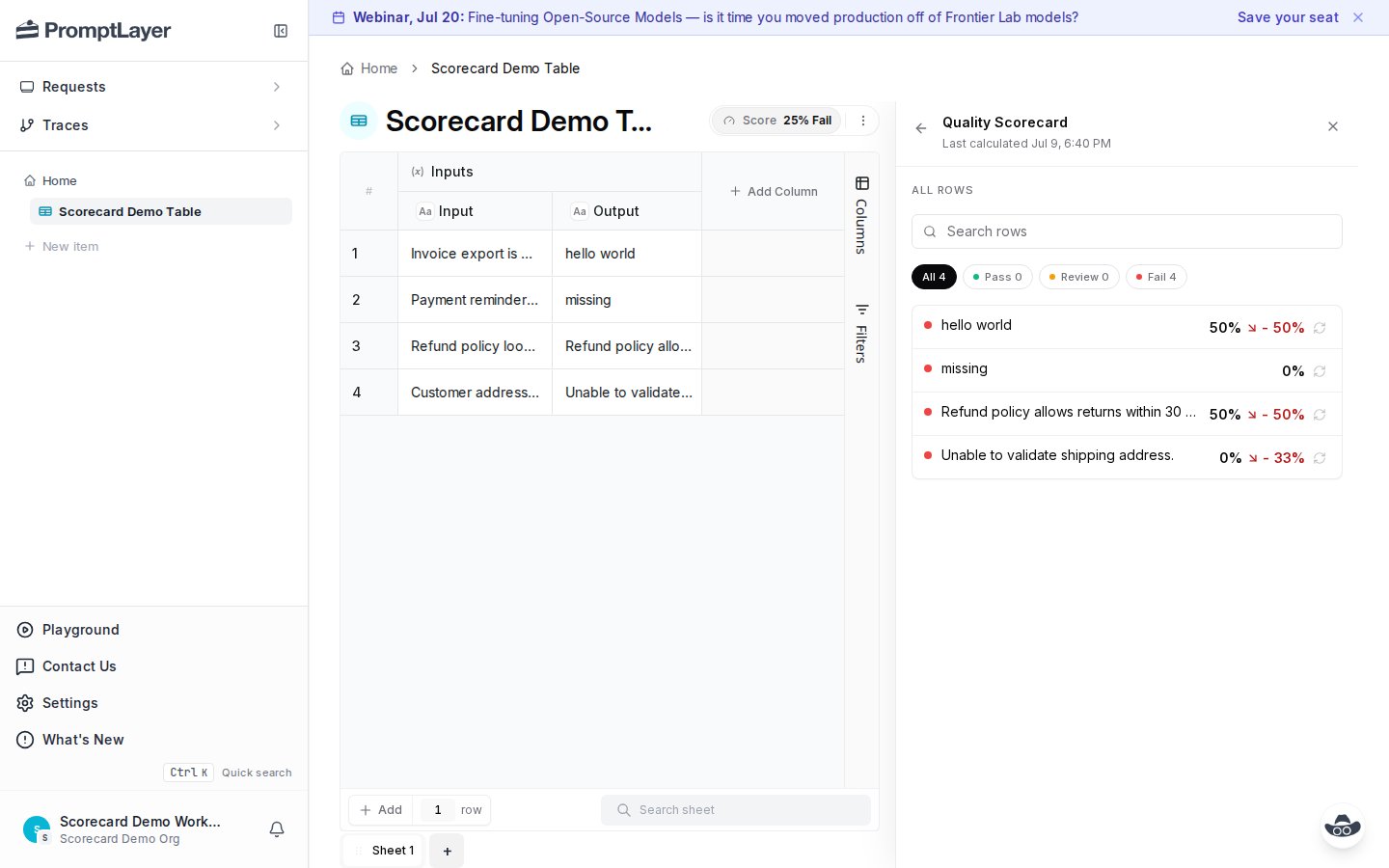 Rows show score, verdict, and drift when a previous calculation is available. This makes regression review concrete. You can find the rows that changed, inspect the evidence, and decide whether to update the prompt, data, or evaluator.
## Inspect row evidence
Open a row to see the evaluated inputs, row score, failed evaluators, and per-evaluator results.
Rows show score, verdict, and drift when a previous calculation is available. This makes regression review concrete. You can find the rows that changed, inspect the evidence, and decide whether to update the prompt, data, or evaluator.
## Inspect row evidence
Open a row to see the evaluated inputs, row score, failed evaluators, and per-evaluator results.
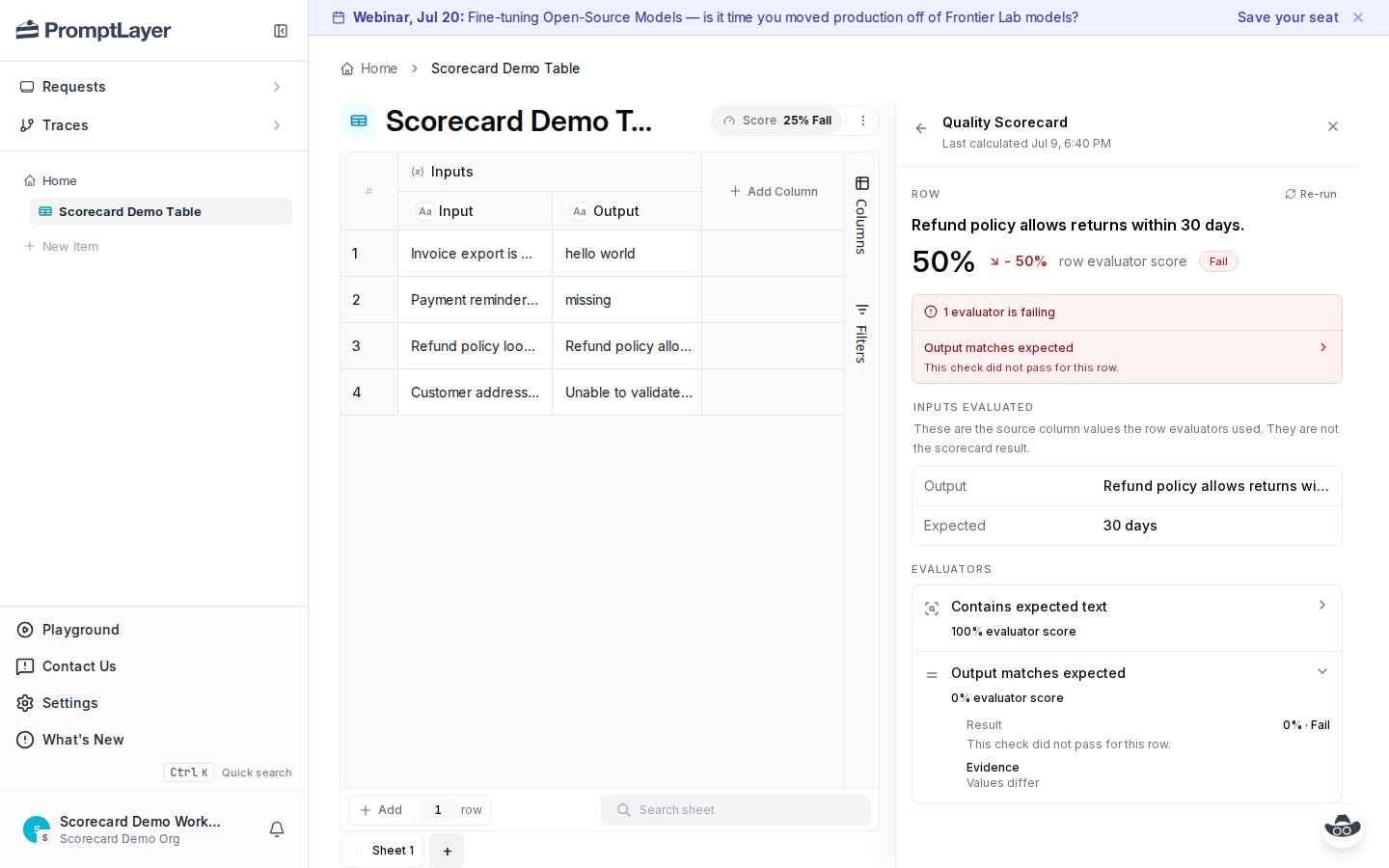 Expand a failed evaluator to see the result and evidence. In the example below, the expected value is `30 days`, and the comparison failed because values differ.
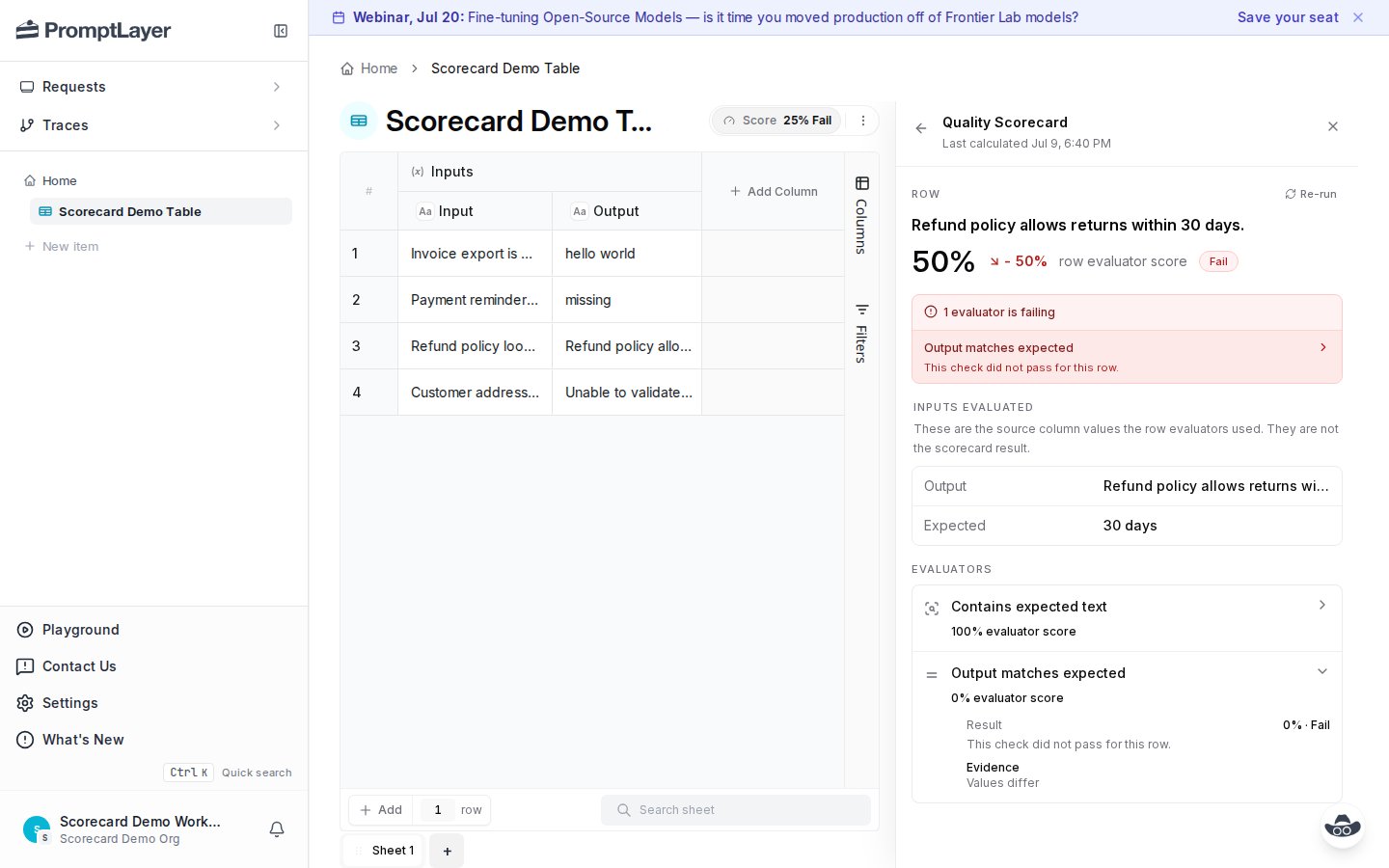 This is the core workflow for prompt iteration. Domain experts can read the row, judge whether the failure is real, and update the prompt or rubric without digging through code.
## Inspect one evaluator
Open an evaluator to see its aggregate result across rows. This view shows the average score, pass count, and each row's result for that criterion.
This is the core workflow for prompt iteration. Domain experts can read the row, judge whether the failure is real, and update the prompt or rubric without digging through code.
## Inspect one evaluator
Open an evaluator to see its aggregate result across rows. This view shows the average score, pass count, and each row's result for that criterion.
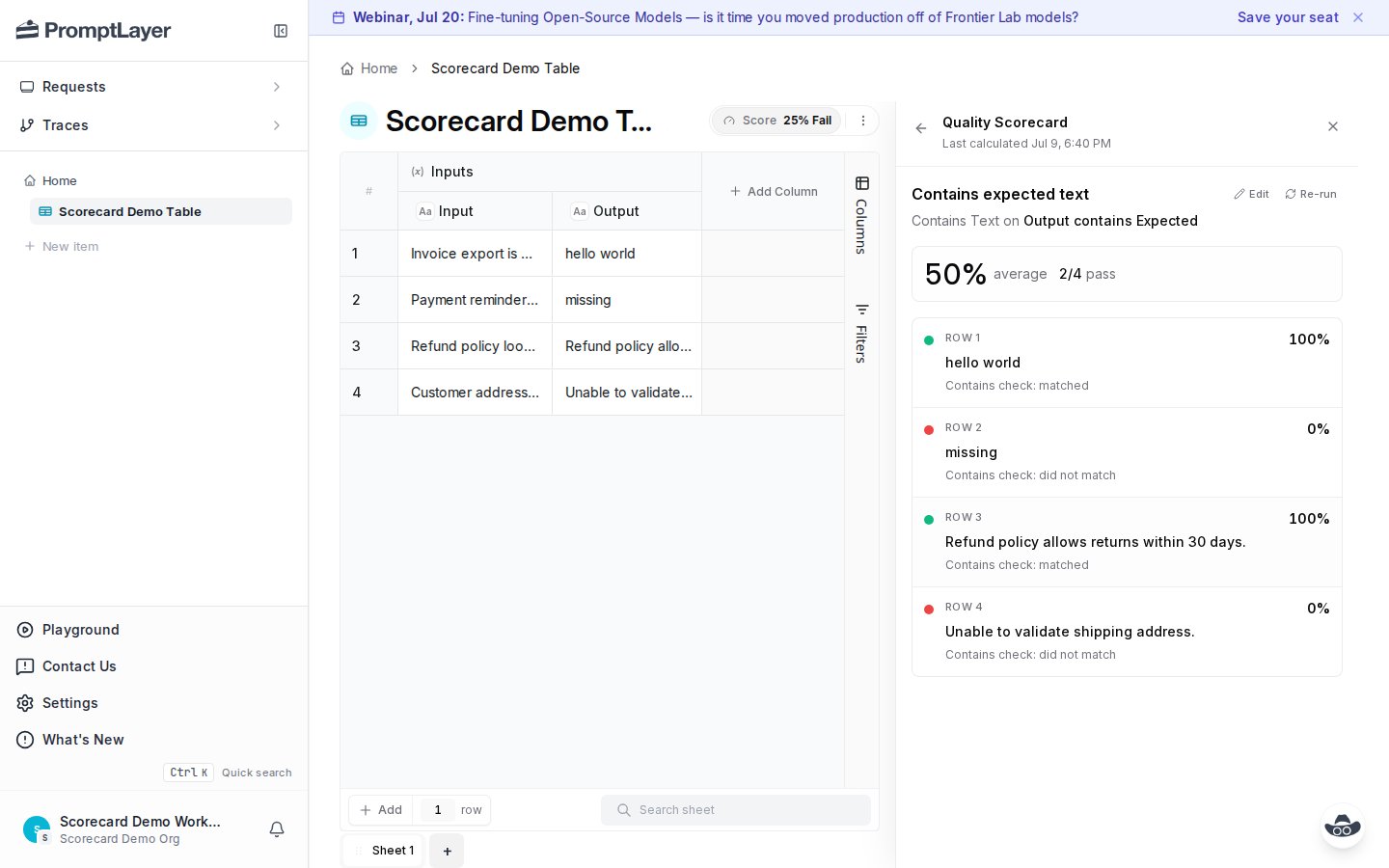 Use this view when one check is noisy. If many rows fail the same evaluator, the evaluator may need a clearer rule, a better expected column, or a different threshold.
## Recalculate after changes
Editing a scorecard or changing inputs can make results stale. The panel marks the scorecard as edited and keeps the previous calculation visible until you rerun.
Use this view when one check is noisy. If many rows fail the same evaluator, the evaluator may need a clearer rule, a better expected column, or a different threshold.
## Recalculate after changes
Editing a scorecard or changing inputs can make results stale. The panel marks the scorecard as edited and keeps the previous calculation visible until you rerun.
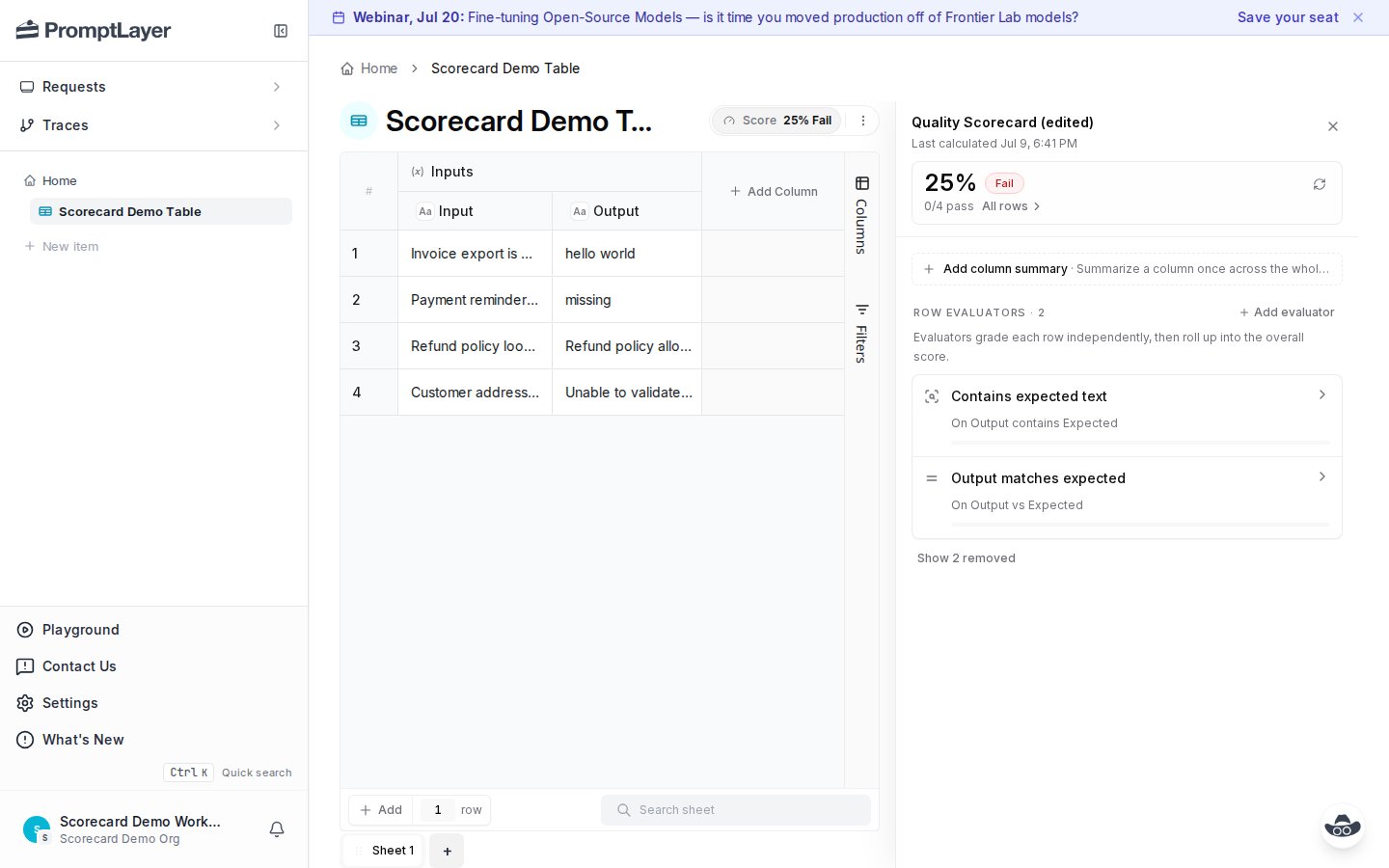 Recalculate after you:
* Add, remove, or edit an evaluator.
* Change a source or expected column.
* Update weights or thresholds.
* Rerun cells that feed the scorecard.
* Import or edit rows in the sheet.
## API workflow
The API uses the same model as the UI.
| Step | Endpoint |
| ---------------------------------- | ---------------------------------------------- |
| Read the current scorecard | `GET /scorecard` |
| Configure criteria and aggregation | `PATCH /scorecard` |
| Queue a calculation | `POST /scorecard/recalculate` |
| Poll calculation status | `GET /scorecard/calculations/{calculation_id}` |
| Review row summaries | `GET /scorecard/rows` |
| Inspect one row | `GET /scorecard/rows/{row_index}` |
| Cancel active work | `POST /scorecard/cancel` |
For scoped work, pass `row_indices` and `step_ids` to recalculation or cancel endpoints. Row pagination uses `cursor` / `next_cursor`; row breakdown fields such as `aggregate_score`, `aggregate_verdict`, and `step_results` are returned at the top level.
## Migrate from legacy `/score`
If your sheet uses legacy scoring, migrate in place and keep current integrations stable.
1. Run `POST /scorecard/migrate-legacy-score` with `delete_legacy_score: false`.
2. Check `converted_count`, `skipped`, and generated `steps`.
3. Run `POST /scorecard/recalculate`.
4. Move consumers from `/score` to `/scorecard` endpoints.
5. Set `delete_legacy_score: true` only after migration is complete.
Some legacy score configurations cannot be converted automatically, including custom scoring code, missing score columns, and unsupported column types. Check `skipped` before deleting legacy score configuration.
## Python SDK example
```python theme={null}
from promptlayer import PromptLayer
client = PromptLayer(api_key="pl_your_key")
table_id = "00000000-0000-0000-0000-000000000000"
sheet_id = "11111111-1111-1111-1111-111111111111"
client.tables.sheets.scorecards.configure(
table_id,
sheet_id,
{
"name": "Quality Scorecard",
"aggregation": {
"method": "weighted_mean",
"required_step_failure_behavior": "fail",
"pass_threshold": 0.8,
"warn_threshold": 0.6,
},
"steps": [
{
"title": "Output matches expected",
"primitive_type": "COMPARE",
"source_column_ids": ["output-column-id", "expected-column-id"],
"weight": 1,
"required": False,
"thresholds": {"pass": 0.8, "warn": 0.6},
"primitive_config": {
"sources": ["output-column-id", "expected-column-id"],
},
}
],
},
)
run = client.tables.sheets.scorecards.recalculate(
table_id,
sheet_id,
{"row_indices": [0, 1, 2], "step_ids": ["22222222-2222-2222-2222-222222222222"]}
)
calculation_id = run["calculation_id"]
rows = client.tables.sheets.scorecards.list_rows(
table_id,
sheet_id,
{"calculation_id": calculation_id, "verdict": "fail", "limit": 50},
)
if rows["rows"]:
row = client.tables.sheets.scorecards.get_row(
table_id,
sheet_id,
rows["rows"][0]["row_index"],
{"calculation_id": calculation_id},
)
print(row["aggregate_score"], row["aggregate_verdict"])
```
## API references
Read scorecard config and display run state.
Create or update criteria and aggregation.
Queue full or scoped scorecard runs.
Review row-level verdicts and drill into failures.
Recalculate after you:
* Add, remove, or edit an evaluator.
* Change a source or expected column.
* Update weights or thresholds.
* Rerun cells that feed the scorecard.
* Import or edit rows in the sheet.
## API workflow
The API uses the same model as the UI.
| Step | Endpoint |
| ---------------------------------- | ---------------------------------------------- |
| Read the current scorecard | `GET /scorecard` |
| Configure criteria and aggregation | `PATCH /scorecard` |
| Queue a calculation | `POST /scorecard/recalculate` |
| Poll calculation status | `GET /scorecard/calculations/{calculation_id}` |
| Review row summaries | `GET /scorecard/rows` |
| Inspect one row | `GET /scorecard/rows/{row_index}` |
| Cancel active work | `POST /scorecard/cancel` |
For scoped work, pass `row_indices` and `step_ids` to recalculation or cancel endpoints. Row pagination uses `cursor` / `next_cursor`; row breakdown fields such as `aggregate_score`, `aggregate_verdict`, and `step_results` are returned at the top level.
## Migrate from legacy `/score`
If your sheet uses legacy scoring, migrate in place and keep current integrations stable.
1. Run `POST /scorecard/migrate-legacy-score` with `delete_legacy_score: false`.
2. Check `converted_count`, `skipped`, and generated `steps`.
3. Run `POST /scorecard/recalculate`.
4. Move consumers from `/score` to `/scorecard` endpoints.
5. Set `delete_legacy_score: true` only after migration is complete.
Some legacy score configurations cannot be converted automatically, including custom scoring code, missing score columns, and unsupported column types. Check `skipped` before deleting legacy score configuration.
## Python SDK example
```python theme={null}
from promptlayer import PromptLayer
client = PromptLayer(api_key="pl_your_key")
table_id = "00000000-0000-0000-0000-000000000000"
sheet_id = "11111111-1111-1111-1111-111111111111"
client.tables.sheets.scorecards.configure(
table_id,
sheet_id,
{
"name": "Quality Scorecard",
"aggregation": {
"method": "weighted_mean",
"required_step_failure_behavior": "fail",
"pass_threshold": 0.8,
"warn_threshold": 0.6,
},
"steps": [
{
"title": "Output matches expected",
"primitive_type": "COMPARE",
"source_column_ids": ["output-column-id", "expected-column-id"],
"weight": 1,
"required": False,
"thresholds": {"pass": 0.8, "warn": 0.6},
"primitive_config": {
"sources": ["output-column-id", "expected-column-id"],
},
}
],
},
)
run = client.tables.sheets.scorecards.recalculate(
table_id,
sheet_id,
{"row_indices": [0, 1, 2], "step_ids": ["22222222-2222-2222-2222-222222222222"]}
)
calculation_id = run["calculation_id"]
rows = client.tables.sheets.scorecards.list_rows(
table_id,
sheet_id,
{"calculation_id": calculation_id, "verdict": "fail", "limit": 50},
)
if rows["rows"]:
row = client.tables.sheets.scorecards.get_row(
table_id,
sheet_id,
rows["rows"][0]["row_index"],
{"calculation_id": calculation_id},
)
print(row["aggregate_score"], row["aggregate_verdict"])
```
## API references
Read scorecard config and display run state.
Create or update criteria and aggregation.
Queue full or scoped scorecard runs.
Review row-level verdicts and drill into failures.