> ## Documentation Index
> Fetch the complete documentation index at: https://docs.promptlayer.com/llms.txt
> Use this file to discover all available pages before exploring further.
# Overview
> Versioned folders of agent instructions (SKILL.md files) you can share, remix, and pull into Claude Code, OpenAI/Codex, or OpenClaw.
A **Skill Collection** is a versioned folder of instructions that teach your coding agent how to behave. Each skill lives in its own subfolder with a `SKILL.md`, alongside provider-specific config (like `CLAUDE.md` or `AGENTS.md`). Edit in the PromptLayer dashboard, version with commit messages and release labels, share a public link, let others **Remix** a copy, and **pull** the collection into your local agent with the PromptLayer SDK.
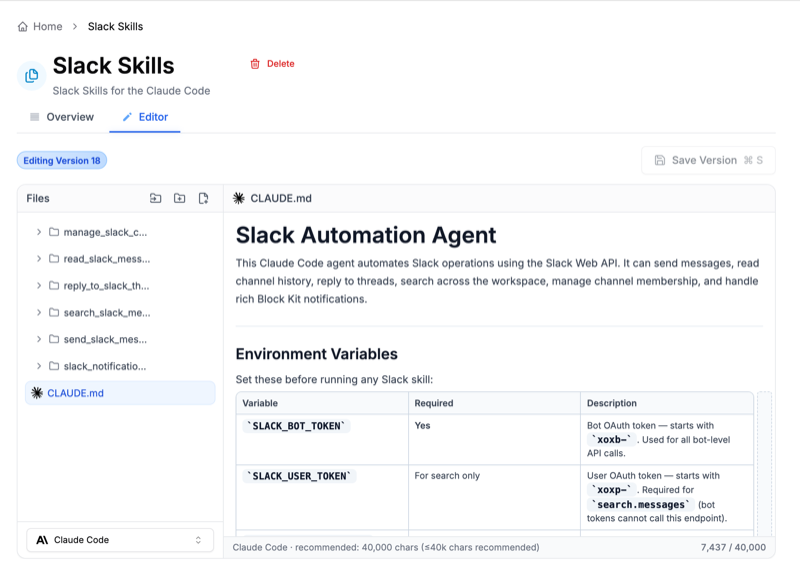 ## Supported layouts
Skill Collections support the following agent environments:
| Layout | Core config | Typical skill paths |
| ------------------ | --------------- | --------------------------------------------------------------- |
| **Claude Code** | `CLAUDE.md` | `my-skill/SKILL.md` |
| **OpenAI / Codex** | `AGENTS.md` | `my-skill/SKILL.md`, `my-skill/agents/openai.yaml` |
| **OpenClaw** | `openclaw.json` | `workspace/skills/my-skill/SKILL.md` plus workspace files |
| **Universal** | Flexible | Portable structure; you can switch to a specific provider later |
**Exports and zip pulls** include the on-disk prefix your tool expects (`.claude/`, `.agents/`, `.openclaw/`). **Public API calls** use paths relative to the collection root (e.g. `triage/SKILL.md`) — not the exported form like `.claude/skills/triage/SKILL.md`.
## What you can do
* **Version** every change with a commit message; optional **release labels** for staging vs production.
* **Share** a read-only link and optionally allow **Remix** so others copy the collection into their workspace.
* **Pull** via the Python or JavaScript SDK into `.claude`, `.agents`, `.openclaw`, or a generic `skills` folder.
* **Compare** versions and roll back from version history in the dashboard.
## Plan limits
These are the default capacity guidelines.
| Plan | Collections | Files per collection |
| ---- | ----------- | -------------------- |
| Free | 1 | 30 |
| Pro | 5 | 50 |
| Team | Unlimited | 100 |
**Hard limit:** any single file must be **5 MiB** or smaller.
## Next steps
Use the in-dashboard assistant to create, edit, rename, or migrate Skill
Collections with natural language.
Publish a read-only link, let others remix into their own workspace, and
show them how to pull the collection.
Sync a collection to disk with the Python or JavaScript SDK, or download via
the public REST API.
Rename folders, edit frontmatter, and pin SDK pulls to release labels.
## Supported layouts
Skill Collections support the following agent environments:
| Layout | Core config | Typical skill paths |
| ------------------ | --------------- | --------------------------------------------------------------- |
| **Claude Code** | `CLAUDE.md` | `my-skill/SKILL.md` |
| **OpenAI / Codex** | `AGENTS.md` | `my-skill/SKILL.md`, `my-skill/agents/openai.yaml` |
| **OpenClaw** | `openclaw.json` | `workspace/skills/my-skill/SKILL.md` plus workspace files |
| **Universal** | Flexible | Portable structure; you can switch to a specific provider later |
**Exports and zip pulls** include the on-disk prefix your tool expects (`.claude/`, `.agents/`, `.openclaw/`). **Public API calls** use paths relative to the collection root (e.g. `triage/SKILL.md`) — not the exported form like `.claude/skills/triage/SKILL.md`.
## What you can do
* **Version** every change with a commit message; optional **release labels** for staging vs production.
* **Share** a read-only link and optionally allow **Remix** so others copy the collection into their workspace.
* **Pull** via the Python or JavaScript SDK into `.claude`, `.agents`, `.openclaw`, or a generic `skills` folder.
* **Compare** versions and roll back from version history in the dashboard.
## Plan limits
These are the default capacity guidelines.
| Plan | Collections | Files per collection |
| ---- | ----------- | -------------------- |
| Free | 1 | 30 |
| Pro | 5 | 50 |
| Team | Unlimited | 100 |
**Hard limit:** any single file must be **5 MiB** or smaller.
## Next steps
Use the in-dashboard assistant to create, edit, rename, or migrate Skill
Collections with natural language.
Publish a read-only link, let others remix into their own workspace, and
show them how to pull the collection.
Sync a collection to disk with the Python or JavaScript SDK, or download via
the public REST API.
Rename folders, edit frontmatter, and pin SDK pulls to release labels.