> ## Documentation Index
> Fetch the complete documentation index at: https://docs.promptlayer.com/llms.txt
> Use this file to discover all available pages before exploring further.
# Metadata
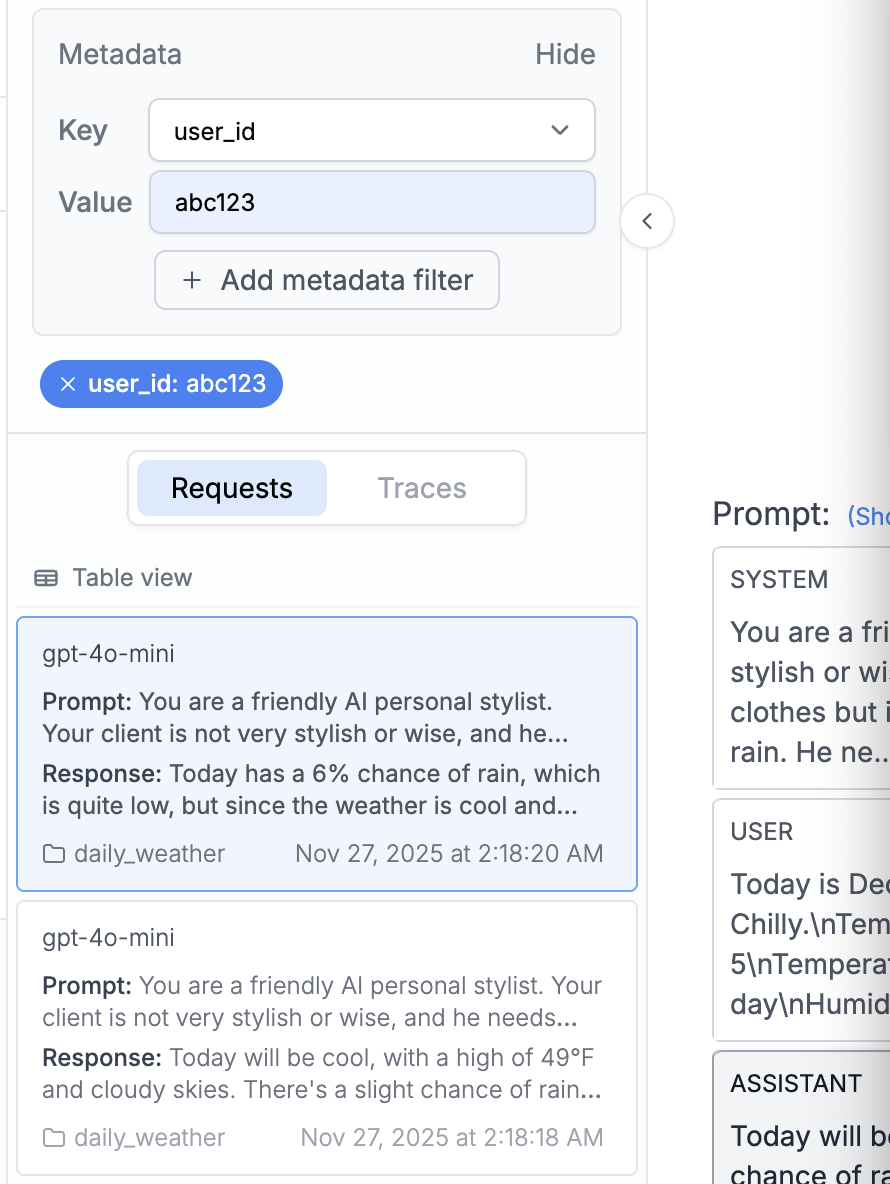
PromptLayer allows you to attach multiple key value pairs as metadata to a request. In the dashboard, you can look up requests and analyze analytics using metadata.
We recommend using this for things like session IDs, user IDs, or error messages. Metadata is useful to help you use the [advanced search](/why-promptlayer/advanced-search) or understand the Analytics page.
## Add metadata when running a prompt
Pass metadata directly into `client.run()` when you already know the request context, such as the user, session, or feature that triggered the prompt.
```python Python theme={null}
response = client.run(
prompt_name="cake-recipe",
input_variables={"cake_type": "Chocolate", "serving_size": "8"},
tags=["production", "recipe-feature"],
metadata={
"user_id": "user_123",
"session_id": "sess_abc"
}
)
client.track.score(request_id=response["request_id"], score=95)
```
Your metadata and tags appear in the log details, letting you filter and search by user or feature.
 ## Add metadata after a request
Use `track.metadata()` when you need to attach or update metadata after a request has already run.
[Endpoint Reference](/reference/track-metadata)
```python Python theme={null}
promptlayer_client.track.metadata(
request_id=pl_request_id,
metadata={
"user_id":"1abf2345f",
"post_id": "2cef2345f"
}
)
```
```js JavaScript theme={null}
promptLayerClient.track.metadata({
request_id: pl_request_id,
metadata: {
"user_id":"1abf2345f",
"post_id": "2cef2345f"
}
})
```
```java Java theme={null}
```
```bash REST theme={null}
curl --request POST \
--url https://api.promptlayer.com/rest/track-metadata \
--header 'Content-Type: application/json' \
--header 'X-API-KEY: pl_' \
--data '{
"request_id": "",
"metadata": {
"user_id":"1abf2345f",
"post_id": "2cef2345f"
}
}'
```
Things to note:
1. Currently keys and values need to be strings in PromptLayer.
2. If you track a key that was already tracked before for a specific request\_id, the value that corresponds to that key will be replaced.
***
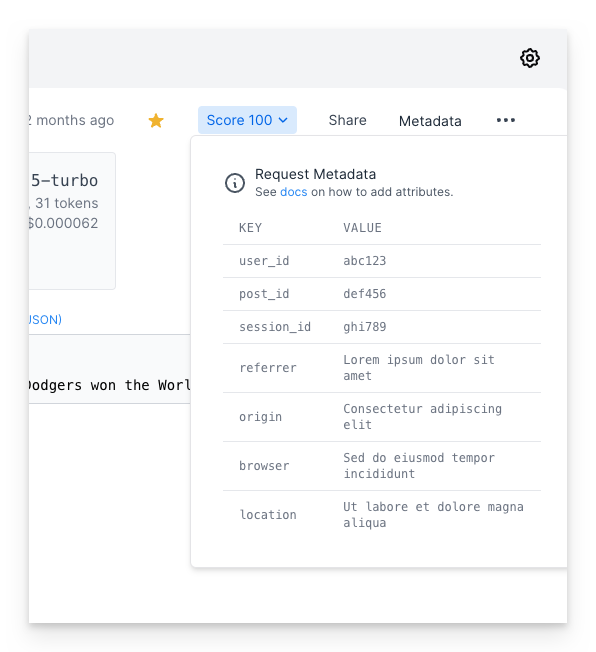
Once metadata is added, you will then be able to see it in the web UI.
## Add metadata after a request
Use `track.metadata()` when you need to attach or update metadata after a request has already run.
[Endpoint Reference](/reference/track-metadata)
```python Python theme={null}
promptlayer_client.track.metadata(
request_id=pl_request_id,
metadata={
"user_id":"1abf2345f",
"post_id": "2cef2345f"
}
)
```
```js JavaScript theme={null}
promptLayerClient.track.metadata({
request_id: pl_request_id,
metadata: {
"user_id":"1abf2345f",
"post_id": "2cef2345f"
}
})
```
```java Java theme={null}
```
```bash REST theme={null}
curl --request POST \
--url https://api.promptlayer.com/rest/track-metadata \
--header 'Content-Type: application/json' \
--header 'X-API-KEY: pl_' \
--data '{
"request_id": "",
"metadata": {
"user_id":"1abf2345f",
"post_id": "2cef2345f"
}
}'
```
Things to note:
1. Currently keys and values need to be strings in PromptLayer.
2. If you track a key that was already tracked before for a specific request\_id, the value that corresponds to that key will be replaced.
***
Once metadata is added, you will then be able to see it in the web UI.
 Metadata is optimized for high-cardinality, request-specific values such as user IDs, session IDs, and error messages. For a smaller set of categories, such as environment, app, feature, or pipeline stage, use [tags](/features/prompt-history/tagging-requests) instead.
## Attaching metadata via OpenTelemetry
If you instrument your app with OpenTelemetry, you can attach metadata directly from span attributes — no `track.metadata()` call required. PromptLayer automatically maps standard attributes like `user.id` and `gen_ai.conversation.id`, and also reads arbitrary `promptlayer.metadata.` attributes.
See [Attaching User Identity & Metadata](/features/opentelemetry#attaching-user-identity-%26-metadata) in the OpenTelemetry guide for details.
Metadata is optimized for high-cardinality, request-specific values such as user IDs, session IDs, and error messages. For a smaller set of categories, such as environment, app, feature, or pipeline stage, use [tags](/features/prompt-history/tagging-requests) instead.
## Attaching metadata via OpenTelemetry
If you instrument your app with OpenTelemetry, you can attach metadata directly from span attributes — no `track.metadata()` call required. PromptLayer automatically maps standard attributes like `user.id` and `gen_ai.conversation.id`, and also reads arbitrary `promptlayer.metadata.` attributes.
See [Attaching User Identity & Metadata](/features/opentelemetry#attaching-user-identity-%26-metadata) in the OpenTelemetry guide for details.