> ## Documentation Index
> Fetch the complete documentation index at: https://docs.promptlayer.com/llms.txt
> Use this file to discover all available pages before exploring further.
# Manual Tracing
> Add PromptLayer SDK spans around prompt runs, application functions, and tools.
Use manual tracing when you call prompts with `PromptLayer.run()` or want to add spans around application functions and tools. If a supported provider SDK or framework already produces the calls, choose its setup method from the [Tracing overview](/features/observability/traces).
## Trace PromptLayer SDK Runs
Enable tracing when you create a PromptLayer client. Calls made through `run()` then participate in the active trace.
```python Python theme={null}
from promptlayer import PromptLayer
pl = PromptLayer(enable_tracing=True)
result = pl.run(
prompt_name="simple-greeting",
input_variables={"name": "Alice"},
)
```
```javascript JavaScript theme={null}
import { PromptLayer } from "promptlayer";
const pl = new PromptLayer({
apiKey: process.env.PROMPTLAYER_API_KEY,
enableTracing: true,
});
const result = await pl.run({
promptName: "simple-greeting",
inputVariables: { name: "Alice" },
});
```
For the full `run()` interface, see the [Python SDK](/sdks/python#using-the-run-method-recommended) or [JavaScript SDK](/sdks/javascript#using-the-run-method-recommended).
This setting also enables installed provider auto-instrumentation. To trace direct OpenAI, Anthropic, or Google GenAI SDK calls, or Bedrock Runtime calls through Boto3 or AWS SDK v3, follow [SDK Auto-Instrumentation](/features/observability/traces/auto-instrumentation/overview) for the required packages, supported APIs, and JavaScript initialization order.
## Add Custom Spans
Use `traceable` in Python or `wrapWithSpan` in JavaScript to record application functions that are not traced by an integration. Give important spans a descriptive name so they are easy to identify in the trace view.
```python Python theme={null}
@pl.traceable(
name="calculate-total",
attributes={"component": "billing"},
)
def calculate_total(items):
return sum(item["price"] for item in items)
```
```javascript JavaScript theme={null}
const calculateTotal = pl.wrapWithSpan(
"calculate-total",
(items) => items.reduce((total, item) => total + item.price, 0)
);
```
If you omit the Python `name`, PromptLayer uses the function name. JavaScript takes the span name as the first argument to `wrapWithSpan`.
## Nest Spans
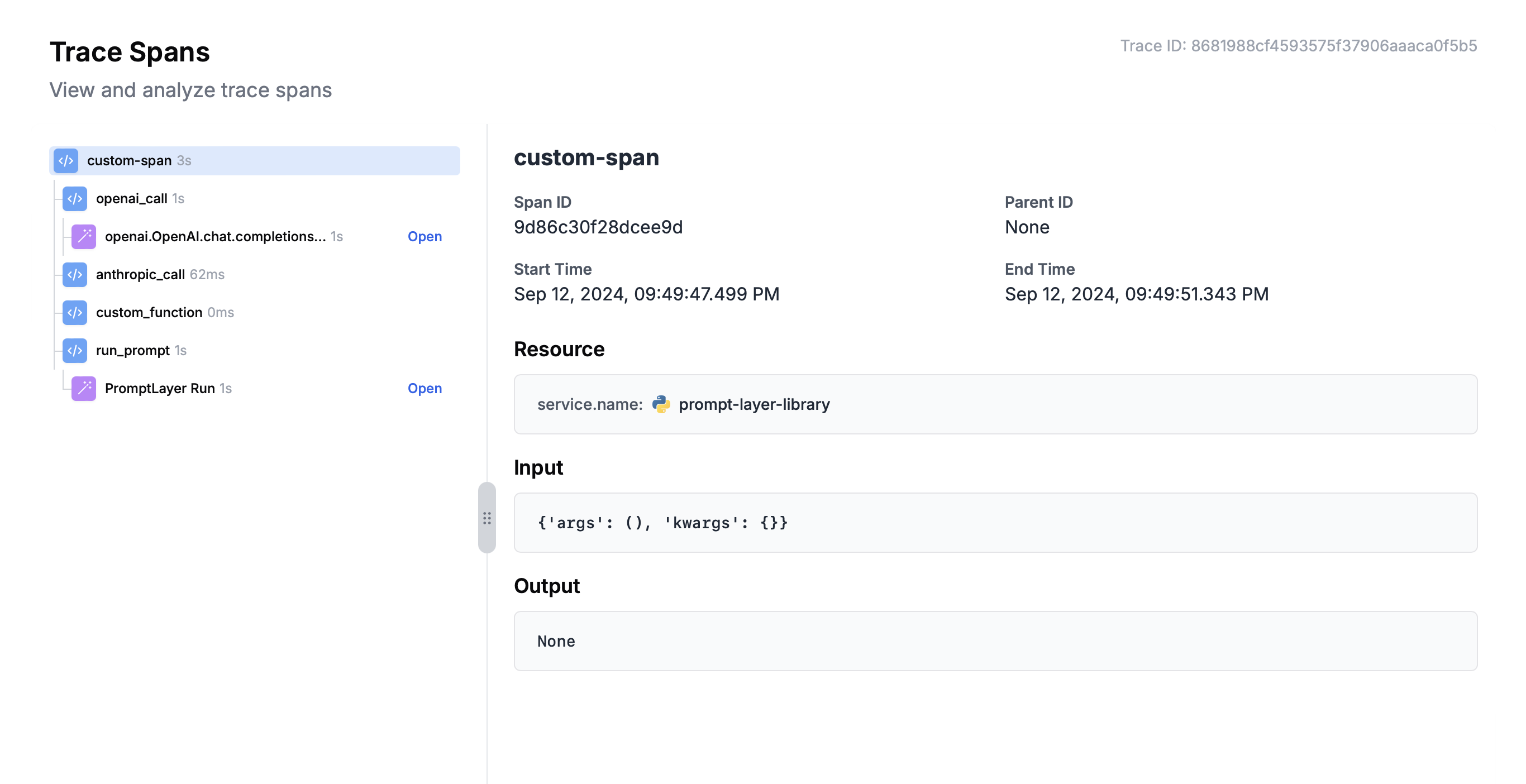
Traced functions called inside another active span become children of that span. When an in-process provider or framework integration preserves the active OpenTelemetry context, its spans also appear as children. This allows one trace to combine application, tool, and LLM spans.
```python Python theme={null}
@pl.traceable()
def retrieve_context(question):
return ["Relevant context"]
@pl.traceable(name="answer-question")
def answer_question(question):
context = retrieve_context(question)
return {"question": question, "context": context}
```
```javascript JavaScript theme={null}
const retrieveContext = pl.wrapWithSpan(
"retrieve-context",
async (question) => ["Relevant context"]
);
const answerQuestion = pl.wrapWithSpan(
"answer-question",
async (question) => ({
question,
context: await retrieveContext(question),
})
);
```
 ## Trace Tools
Use `traceTool` for tool handlers in a custom agent that does not already have a dedicated [Telemetry Integration](/features/observability/traces/integrations). PromptLayer names the span `Tool: ` and marks it as a tool call.
```python Python theme={null}
@pl.traceTool(name="get_weather")
def get_weather(city: str) -> str:
return f"{city} is 72F and sunny."
```
```javascript JavaScript theme={null}
const getWeather = pl.traceTool(
"get_weather",
async (city) => `${city} is 72F and sunny.`
);
```
`traceTool` records only when tracing is enabled on the client. The tool name is also used by tool-aware features such as the [Trajectory scorer](/sdks/evals/scorers/overview#trajectory).
## Trace Tools
Use `traceTool` for tool handlers in a custom agent that does not already have a dedicated [Telemetry Integration](/features/observability/traces/integrations). PromptLayer names the span `Tool: ` and marks it as a tool call.
```python Python theme={null}
@pl.traceTool(name="get_weather")
def get_weather(city: str) -> str:
return f"{city} is 72F and sunny."
```
```javascript JavaScript theme={null}
const getWeather = pl.traceTool(
"get_weather",
async (city) => `${city} is 72F and sunny.`
);
```
`traceTool` records only when tracing is enabled on the client. The tool name is also used by tool-aware features such as the [Trajectory scorer](/sdks/evals/scorers/overview#trajectory).