> ## Documentation Index
> Fetch the complete documentation index at: https://docs.promptlayer.com/llms.txt
> Use this file to discover all available pages before exploring further.
# Signals
> Label production request logs with automated yes/no assertions, reasoning, and citations.
Signals let you ask a yes/no question about incoming request logs and automatically label matching production traffic **true** or **false**. Each evaluation includes reasoning and a quote from the request so you can review why PromptLayer classified it that way.
Signals enrich [request logs](/features/observability/request-logs). Return to [Configure Request Logging](/features/observability/request-logs) for the other enrichment options.
For example, you can ask whether the assistant answered in the user's language, whether a required disclaimer was included, or whether the model stayed on topic.
 ## Create a Signal
1. Open **Signals** in the PromptLayer sidebar.
2. Select **New signal**.
3. Enter a name and write your yes/no question in the signal statement field.
4. Add one or more hooks to define where the signal runs and how often it is sampled.
5. Save the signal. When you are ready for production evaluation, turn **Enabled** on.
## Create a Signal
1. Open **Signals** in the PromptLayer sidebar.
2. Select **New signal**.
3. Enter a name and write your yes/no question in the signal statement field.
4. Add one or more hooks to define where the signal runs and how often it is sampled.
5. Save the signal. When you are ready for production evaluation, turn **Enabled** on.
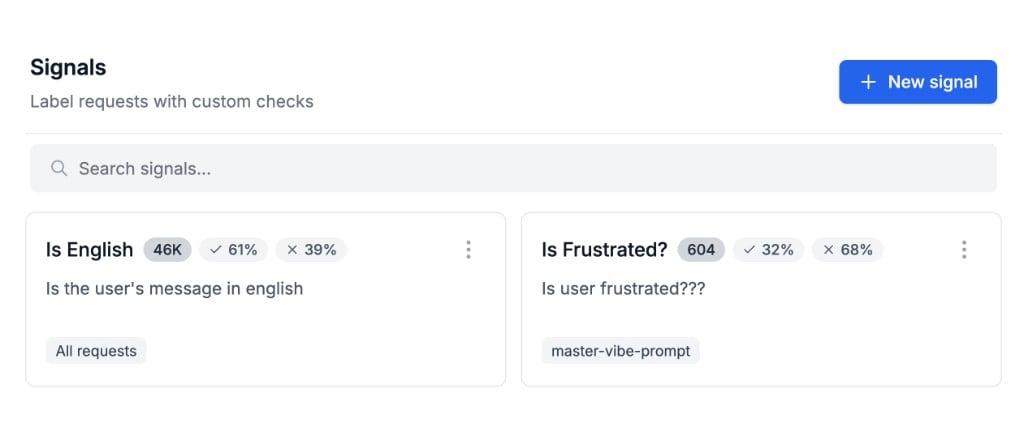 The Signals list shows each signal's question, scope, and running totals for processed requests and true/false distribution.
## Scope with hooks
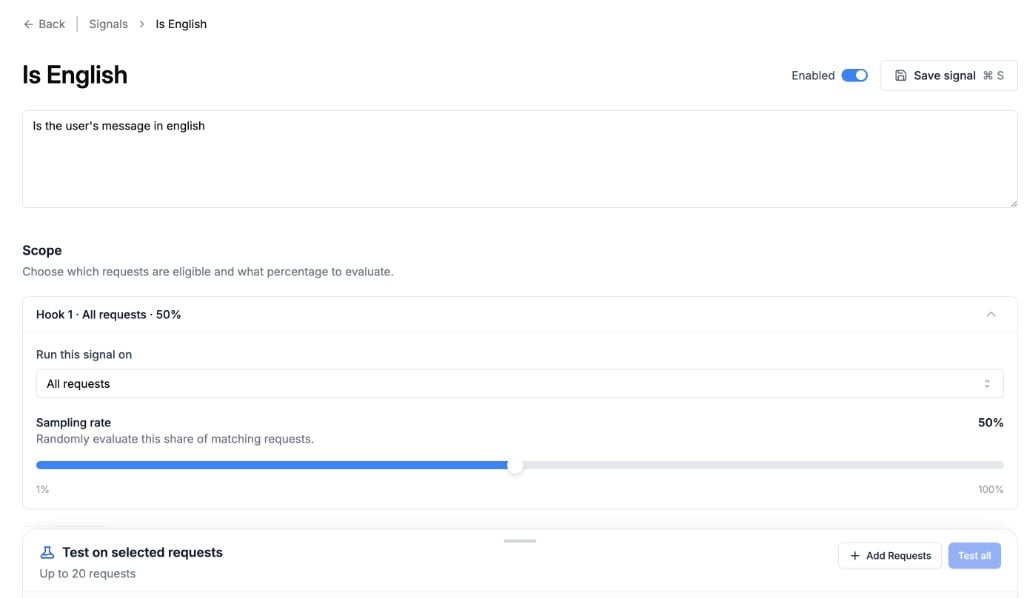
Each hook controls which request logs a signal evaluates and at what rate.
| Scope | Runs on |
| ---------------------------- | ---------------------------------------------------------------------------------- |
| **All requests** | Every request log in the workspace |
| **Prompt template label** | Requests that use a prompt version with the selected release label |
| **Specific prompt template** | Requests for one prompt template, optionally limited to a version or release label |
Each hook has its own **sample rate** (default 50%). PromptLayer evaluates only the sampled share of matching traffic, which helps control cost on high-volume prompts.
A signal can have multiple hooks. Use this when the same question should apply to different prompts, labels, or sampling rates.
The Signals list shows each signal's question, scope, and running totals for processed requests and true/false distribution.
## Scope with hooks
Each hook controls which request logs a signal evaluates and at what rate.
| Scope | Runs on |
| ---------------------------- | ---------------------------------------------------------------------------------- |
| **All requests** | Every request log in the workspace |
| **Prompt template label** | Requests that use a prompt version with the selected release label |
| **Specific prompt template** | Requests for one prompt template, optionally limited to a version or release label |
Each hook has its own **sample rate** (default 50%). PromptLayer evaluates only the sampled share of matching traffic, which helps control cost on high-volume prompts.
A signal can have multiple hooks. Use this when the same question should apply to different prompts, labels, or sampling rates.
 ## Test before enabling
Before you enable a signal in production, test it on real request logs:
1. In the **Test on selected requests** panel, add up to 20 request logs from history or from your current scope.
2. Run **Try signal** on individual logs or **Test all** across the set.
3. Review the true/false result, reasoning, and citation for each log.
Testing does not change production behavior. Use it to refine your signal statement and confirm the labels match your expectations.
## Use results in Request Logs
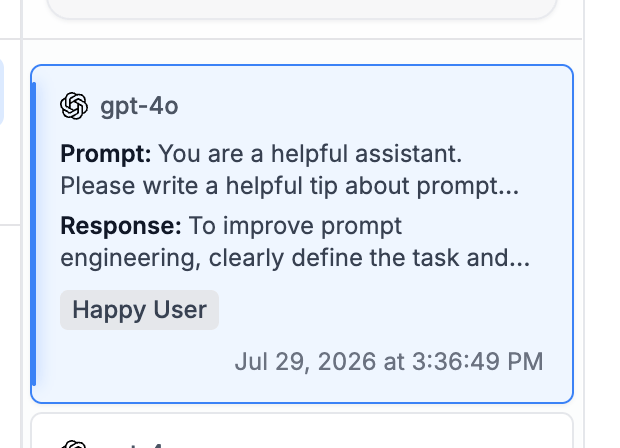
When a signal is enabled, evaluated requests show **true** or **false** labels in the Request Logs table and in request details. Select a label to filter the table to matching results.
See [Search](/features/search-and-analytics/search) to filter request logs by signal results from the search bar.
## Signals, tags, and scores
Signals, [tags](/features/observability/request-logs/tags), and [scores](/features/observability/request-logs/scores) all help you organize and review request logs, but they work differently:
| Enrichment | How it works |
| ----------- | ---------------------------------------------------------------------------------------- |
| **Tags** | Categories you attach when logging a request, such as environment or pipeline stage |
| **Scores** | Numeric ratings from 0–100 that you or your application assign to a request |
| **Signals** | Automated yes/no labels PromptLayer applies to production traffic based on your question |
Use tags for manual categorization at log time. Use scores when you need a numeric rating. Use Signals when you want PromptLayer to continuously evaluate production requests against a yes/no question.
## Test before enabling
Before you enable a signal in production, test it on real request logs:
1. In the **Test on selected requests** panel, add up to 20 request logs from history or from your current scope.
2. Run **Try signal** on individual logs or **Test all** across the set.
3. Review the true/false result, reasoning, and citation for each log.
Testing does not change production behavior. Use it to refine your signal statement and confirm the labels match your expectations.
## Use results in Request Logs
When a signal is enabled, evaluated requests show **true** or **false** labels in the Request Logs table and in request details. Select a label to filter the table to matching results.
See [Search](/features/search-and-analytics/search) to filter request logs by signal results from the search bar.
## Signals, tags, and scores
Signals, [tags](/features/observability/request-logs/tags), and [scores](/features/observability/request-logs/scores) all help you organize and review request logs, but they work differently:
| Enrichment | How it works |
| ----------- | ---------------------------------------------------------------------------------------- |
| **Tags** | Categories you attach when logging a request, such as environment or pipeline stage |
| **Scores** | Numeric ratings from 0–100 that you or your application assign to a request |
| **Signals** | Automated yes/no labels PromptLayer applies to production traffic based on your question |
Use tags for manual categorization at log time. Use scores when you need a numeric rating. Use Signals when you want PromptLayer to continuously evaluate production requests against a yes/no question.