> ## Documentation Index
> Fetch the complete documentation index at: https://docs.promptlayer.com/llms.txt
> Use this file to discover all available pages before exploring further.
# Metadata
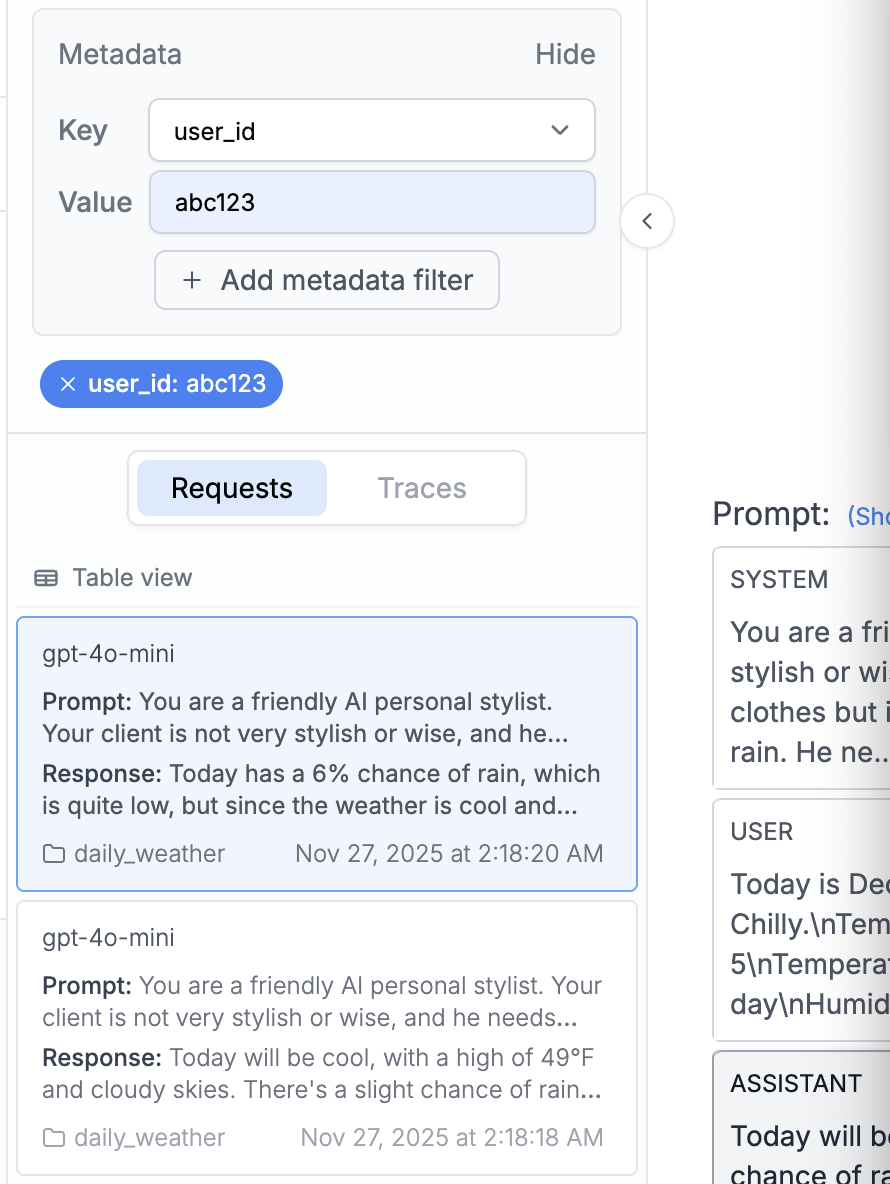
PromptLayer allows you to attach multiple key value pairs as metadata to a request. In the dashboard, you can look up requests and analyze analytics using metadata.
Metadata enriches [request logs](/features/observability/request-logs). Return to [Configure Request Logging](/features/observability/request-logs) for the other enrichment options.
We recommend using this for things like session IDs, user IDs, or error messages. Metadata is useful for [searching request logs](/features/search-and-analytics/search) and analyzing grouped results.
## Add metadata when running a prompt
Pass metadata directly into `client.run()` when you already know the request context, such as the user, session, or feature that triggered the prompt.
```python Python theme={null}
response = client.run(
prompt_name="cake-recipe",
input_variables={"cake_type": "Chocolate", "serving_size": "8"},
tags=["production", "recipe-feature"],
metadata={
"user_id": "user_123",
"session_id": "sess_abc"
}
)
client.track.score(request_id=response["request_id"], score=95)
```
Your metadata and tags appear in the log details, letting you filter and search by user or feature.
 ## Add metadata after a request
Use `track.metadata()` when you need to attach or update metadata after a request has already run.
[Endpoint Reference](/reference/track-metadata)
```python Python theme={null}
promptlayer_client.track.metadata(
request_id=pl_request_id,
metadata={
"user_id":"1abf2345f",
"post_id": "2cef2345f"
}
)
```
```js JavaScript theme={null}
promptLayerClient.track.metadata({
request_id: pl_request_id,
metadata: {
"user_id":"1abf2345f",
"post_id": "2cef2345f"
}
})
```
```java Java theme={null}
```
```bash REST theme={null}
curl --request POST \
--url https://api.promptlayer.com/rest/track-metadata \
--header 'Content-Type: application/json' \
--header 'X-API-KEY: pl_' \
--data '{
"request_id": "",
"metadata": {
"user_id":"1abf2345f",
"post_id": "2cef2345f"
}
}'
```
Things to note:
1. Currently keys and values need to be strings in PromptLayer.
2. If you track a key that was already tracked before for a specific request\_id, the value that corresponds to that key will be replaced.
***
Once metadata is added, you will then be able to see it in the web UI.
## Add metadata after a request
Use `track.metadata()` when you need to attach or update metadata after a request has already run.
[Endpoint Reference](/reference/track-metadata)
```python Python theme={null}
promptlayer_client.track.metadata(
request_id=pl_request_id,
metadata={
"user_id":"1abf2345f",
"post_id": "2cef2345f"
}
)
```
```js JavaScript theme={null}
promptLayerClient.track.metadata({
request_id: pl_request_id,
metadata: {
"user_id":"1abf2345f",
"post_id": "2cef2345f"
}
})
```
```java Java theme={null}
```
```bash REST theme={null}
curl --request POST \
--url https://api.promptlayer.com/rest/track-metadata \
--header 'Content-Type: application/json' \
--header 'X-API-KEY: pl_' \
--data '{
"request_id": "",
"metadata": {
"user_id":"1abf2345f",
"post_id": "2cef2345f"
}
}'
```
Things to note:
1. Currently keys and values need to be strings in PromptLayer.
2. If you track a key that was already tracked before for a specific request\_id, the value that corresponds to that key will be replaced.
***
Once metadata is added, you will then be able to see it in the web UI.
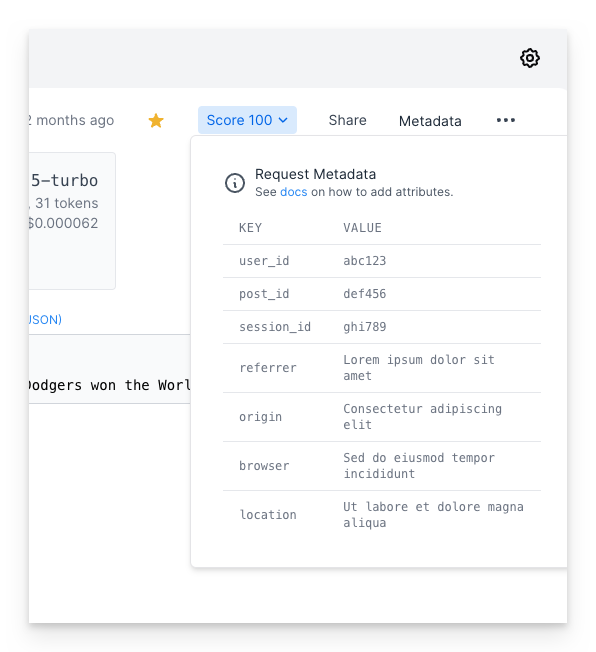 Metadata is optimized for high-cardinality, request-specific values such as user IDs, session IDs, and error messages. For a smaller set of categories, such as environment, app, feature, or pipeline stage, use [tags](/features/observability/request-logs/tags) instead.
## Attaching metadata via OpenTelemetry
If you instrument your app with OpenTelemetry, you can attach metadata directly from span attributes — no `track.metadata()` call required. PromptLayer automatically maps standard attributes like `user.id` and `gen_ai.conversation.id`, and also reads arbitrary `promptlayer.metadata.` attributes.
See [Attaching User Identity & Metadata](/features/observability/traces/opentelemetry#attaching-user-identity-%26-metadata) in the OpenTelemetry guide for details.
Metadata is optimized for high-cardinality, request-specific values such as user IDs, session IDs, and error messages. For a smaller set of categories, such as environment, app, feature, or pipeline stage, use [tags](/features/observability/request-logs/tags) instead.
## Attaching metadata via OpenTelemetry
If you instrument your app with OpenTelemetry, you can attach metadata directly from span attributes — no `track.metadata()` call required. PromptLayer automatically maps standard attributes like `user.id` and `gen_ai.conversation.id`, and also reads arbitrary `promptlayer.metadata.` attributes.
See [Attaching User Identity & Metadata](/features/observability/traces/opentelemetry#attaching-user-identity-%26-metadata) in the OpenTelemetry guide for details.